Formvexa First Look: Is This New Drag-and-Drop Form Builder Worth Installing Over WPForms or Gravity Forms?
By Day Zero Guides Editorial · How we produce guides
Some links in this guide are affiliate links. If you sign up through them, Day Zero Guides may earn a commission at no extra cost to you. This never affects which products we cover or what we say about them. See our affiliate disclosure for details.
Where Formvexa Fits Before You Install It
If you already run WordPress and need a contact form, you've got three entrenched options staring at you in the plugin directory: Contact Form 7 (free, ubiquitous, famously unfriendly to beginners), WPForms (the drag-and-drop market leader with a steep pricing ladder), and Gravity Forms (the developer favorite for complex logic and integrations, sold as a premium-only plugin). Formvexa is a new entrant trying to wedge itself between the first two — it wants to be as approachable as WPForms' builder without the aggressive upsell wall, while staying free-to-install like Contact Form 7.
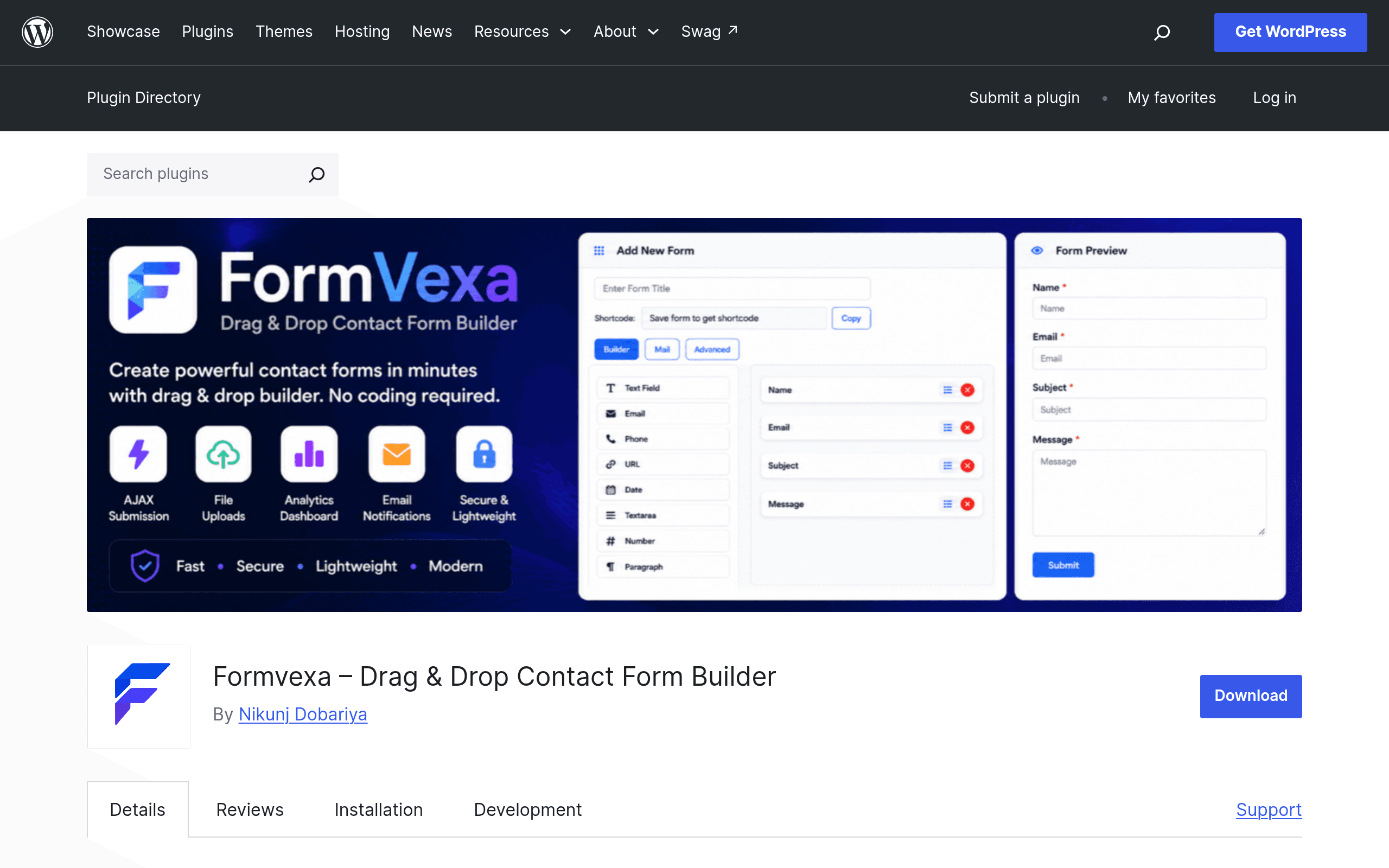
The pitch, based on the plugin's WordPress.org listing, is straightforward: a visual drag-and-drop editor, unlimited forms, email notifications, file upload fields, an entries inbox inside wp-admin, and built-in Google reCAPTCHA for spam filtering — all without touching code. That's a reasonable checklist for 80% of what small business sites, agencies, and bloggers actually need a form for: contact pages, quote requests, simple job applications, and lead capture.
What makes Formvexa worth a look right now isn't a killer unique feature — it's that it's brand new, actively being iterated on, and distributed through the free WordPress.org repository rather than gated behind a licensing wall from day one. That's also the catch: because it's new, it doesn't yet have the track record, the integration ecosystem (Stripe, Mailchimp, HubSpot, Zapier, etc.), or the years of edge-case bug fixes that WPForms and Gravity Forms have banked.
What Formvexa Actually Does
Based on the published plugin description, Formvexa covers:
- Drag-and-drop form builder — assemble forms visually, no shortcode memorization or manual field coding required.
- Unlimited forms — no artificial cap on how many forms you can build, which some competitors restrict on their free tiers.
- Email notifications — admin and/or submitter notifications on form submission.
- File upload fields — useful for resume submissions, support tickets with screenshots, or document collection.
- Entry management — submissions are stored and viewable inside the WordPress dashboard, not just emailed and forgotten.
- Google reCAPTCHA integration — spam protection without needing a separate anti-spam plugin.
What's notably absent from the current listing: payment field integrations (Stripe/PayPal), conditional logic, multi-page forms, and third-party marketing integrations like Mailchimp or ActiveCampaign. These are the features that typically live behind WPForms' and Gravity Forms' paid tiers — so if your use case is strictly "collect a message and an email address, maybe attach a file," Formvexa's free feature set already covers it. If you need payment collection or CRM syncing, you'll hit a wall today.
Pricing: What's Actually Published
Here's the honest state of things as of this writing: Formvexa has no published pricing page or premium tier. It's distributed as a free plugin through the official WordPress.org plugin directory, and the listing makes no mention of a Pro add-on, license keys, or paid upgrade path. That's unusual for a form builder in 2024 — nearly every competitor in this space (WPForms, Gravity Forms, Forminator, Ninja Forms) runs a freemium or premium-only model.
Two things can be true here: either Formvexa intends to stay a fully free plugin funded by something else (donations, a future marketplace, or a parent product), or a paid tier is coming later and simply hasn't been announced yet. Given how new the plugin is, we'd treat the current all-free state as provisional rather than a permanent pricing promise. If you install it today, you're getting the full feature set at no cost — but don't assume that's locked in forever.
How It Stacks Up Against the Established Players
| Formvexa | WPForms | Gravity Forms | Contact Form 7 | |
|---|---|---|---|---|
| Price | Free (no paid tier published yet) | Free "Lite" version; paid plans from $49.50/yr (Basic) up to ~$299.50/yr (Elite) | No free version; paid plans from ~$59/yr (Basic) to ~$259/yr (Elite), per site | Free, with paid add-ons (e.g., CF7 Skins, Flamingo for entry storage) sold separately by third parties |
| Builder experience | Drag-and-drop visual editor | Drag-and-drop visual editor, widely considered best-in-class for beginners | Drag-and-drop but more form-logic/developer oriented | No visual builder — shortcode and manual markup based, steep learning curve |
| Entry storage | Built-in entries view in wp-admin | Built-in, with export options on paid tiers | Built-in, robust entry/export tooling | Not built-in by default — requires the separate Flamingo plugin to store submissions |
| Spam protection | Google reCAPTCHA built in | reCAPTCHA, hCaptcha, honeypot options | reCAPTCHA, honeypot, Akismet integration | Requires separate anti-spam plugin (e.g., Akismet) for most setups |
| Payments / integrations | None published yet | Stripe, PayPal, Square, Mailchimp, Zapier on paid tiers | Stripe, PayPal, Zapier, extensive add-on marketplace | Minimal; relies on third-party extensions |
| Best for | Simple sites wanting a free, no-code builder without upgrade nags | Teams wanting the easiest builder UX and willing to pay for integrations | Agencies/developers needing complex logic, calculations, multi-page forms | Developers comfortable with code who want a lightweight, free base to extend |
Concrete Use Cases Where Formvexa Makes Sense
- A local service business site (plumber, photographer, tutor) that needs one or two contact forms with file upload for reference photos or documents, and doesn't want to pay an annual license for something that simple.
- An agency building low-budget client sites where Contact Form 7's shortcode workflow is slower to hand off to a non-technical client, but a $49.50/yr WPForms Basic license isn't in the project budget.
- A blogger or small nonprofit collecting volunteer sign-ups or feedback forms, where entries need to live in the dashboard (unlike CF7's default setup) but no payment collection or CRM sync is required.
- Anyone testing whether a drag-and-drop builder improves their workflow before committing budget to WPForms Pro or a Gravity Forms license — Formvexa works as a genuinely free trial of the drag-and-drop paradigm itself.
Where It Falls Short Today
- No visible integration marketplace — if you need Mailchimp, HubSpot, Stripe, or Zapier, none of the big three's paid tiers are replaceable by Formvexa right now.
- No conditional logic or multi-page forms mentioned in the listing, which limits it to simple, linear forms.
- As a new plugin, it lacks the multi-year security and compatibility track record of CF7, WPForms, and Gravity Forms — worth testing on a staging site first, and worth checking the "Active installations" and "Tested up to" WordPress version fields on its plugin page before deploying to a production site.
- No changelog history to evaluate how actively bugs are being patched yet.
Bottom Line
Formvexa is worth installing today if your form needs are simple — contact forms, file uploads, email notifications — and you want a visual builder without an annual license fee. It directly targets the gap between Contact Form 7 (free but code-first) and WPForms (visual but paywalled past the basics). It is not yet a replacement for Gravity Forms in agency or logic-heavy contexts, and because pricing isn't published, you should assume the free ride could change as the plugin matures. Test it on a staging install before pointing a production contact form at it.