Scholar Sync: First Look at the New OpenAlex-Powered WordPress Plugin for Researcher Profiles
By Day Zero Guides Editorial · How we produce guides
Some links in this guide are affiliate links. If you sign up through them, Day Zero Guides may earn a commission at no extra cost to you. This never affects which products we cover or what we say about them. See our affiliate disclosure for details.
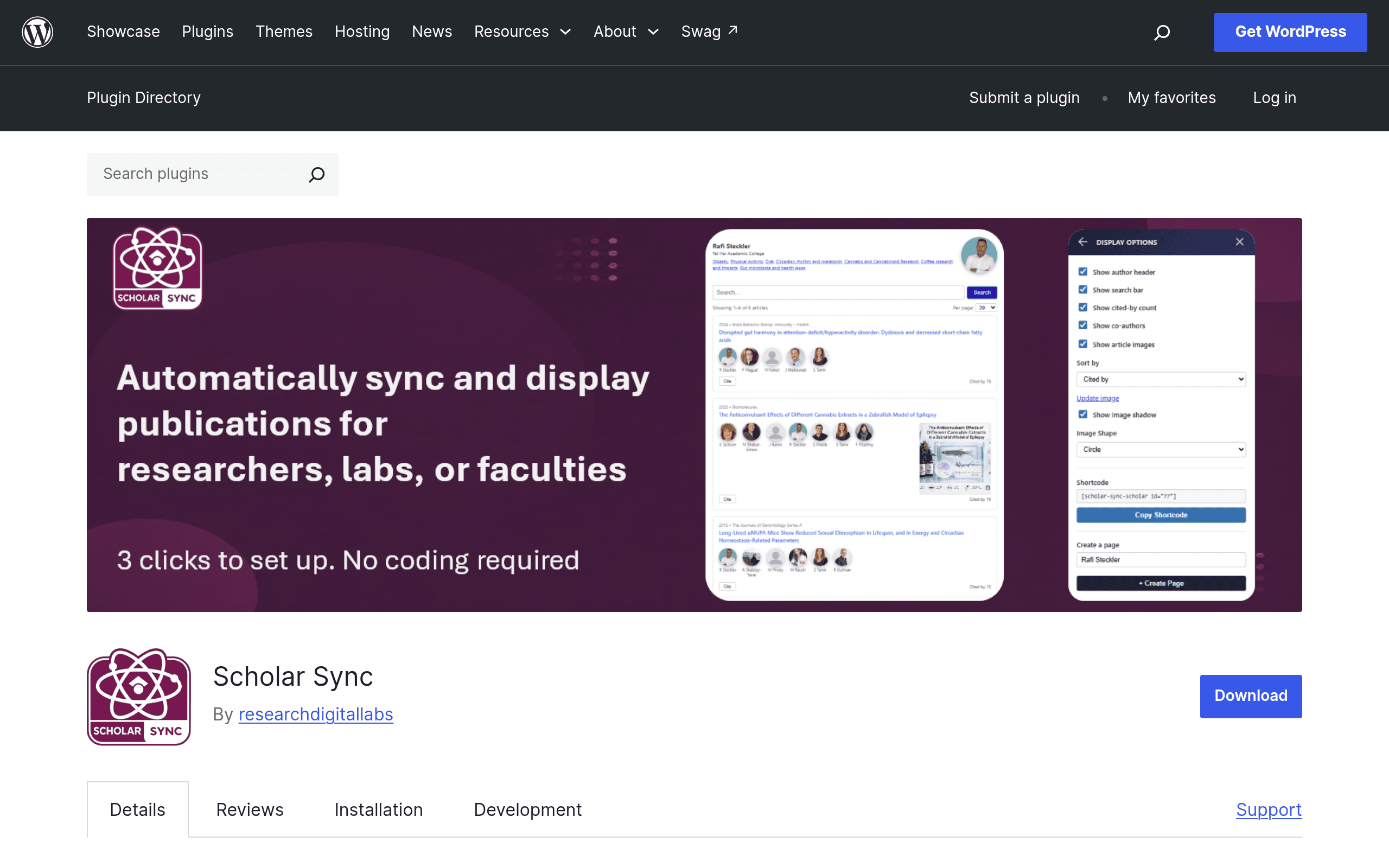
What Scholar Sync Actually Does
Scholar Sync is a WordPress plugin that pulls researcher metadata — profiles, publication lists, and citation counts — directly from OpenAlex, the free and open scholarly database that replaced Microsoft Academic Graph. Once you connect a researcher's OpenAlex ID (or search for them by name inside the plugin), Scholar Sync builds a profile page or embeddable block on your WordPress site and keeps it updated in the background via a scheduled sync, so you're not manually copy-pasting publication lists every semester.
This matters because most university department sites, lab pages, and research center sites currently handle "faculty publications" one of two ways: an intern updates a static page twice a year, or someone links out to Google Scholar and calls it done. Scholar Sync is aimed squarely at that gap — it's built for people running WordPress sites (which is still the dominant CMS for university department pages, research centers, and independent lab sites) who want live, low-maintenance researcher data without standing up a full research information management system.
Who This Is Actually For
- A university department that wants a "Faculty" page where each professor's publication count and h-index-style metrics update automatically instead of going stale.
- A research lab or center that wants a single "Our Researchers" grid showing 8–20 people, sorted by recent output, without a developer maintaining a custom database.
- An individual academic with a personal WordPress site who wants their CV page to reflect new publications the week they're indexed in OpenAlex, not the next time they remember to update it.
- A science communication or grant-funded project site that needs to show a roster of affiliated researchers and their combined output to funders or the public.
What it is not built for: institutional-level research reporting to funding bodies, REF/TEF-style assessment exercises, or grant compliance tracking. That's a different category of tool entirely (more on that below).
How the Sync Actually Works
Scholar Sync queries the OpenAlex API on a schedule (configurable in paid tiers, fixed interval on the free tier) and caches results in your WordPress database, rather than hitting the API live on every page load. You can display:
- A single researcher profile (bio, affiliation, publication list, citation metrics)
- A curated group/roster view with sorting and filtering options
- Individual publication lists as a shortcode or block, embeddable anywhere
Because it's OpenAlex-based rather than manually maintained, data quality is only as good as OpenAlex's own author disambiguation — if a researcher's OpenAlex profile is merged incorrectly with a same-named author, that error will show up on your site too. Worth checking each researcher's OpenAlex ID before syncing rather than relying purely on name search.
Pricing: What's Actually Published Right Now
As of this plugin's listing on the WordPress.org plugin directory, the core plugin is free and installable directly from the WordPress plugin repository. The free tier covers the basics: connecting researcher profiles, displaying individual and group views, and background syncing at a fixed, lower frequency.
Paid plans exist for higher sync frequency and larger API request quotas — this matters if you're running a roster of 50+ researchers and want daily (rather than weekly) refreshes, or if you're on a site with heavy traffic hitting cached profile pages. However, at the time of writing, specific dollar amounts for the paid tiers are not published on the plugin's WordPress.org page or in the plugin settings screen beyond referencing that upgraded plans exist. If pricing transparency matters to your procurement process, this is the one point where Scholar Sync currently falls short — you'll need to install it and check the in-plugin upgrade prompts, or contact the developer directly, to get a quote before committing budget.
Practical takeaway: there's no reason not to install the free tier today to test it against a real researcher roster before deciding if the paid quota increase is worth pursuing.
Concrete Use Cases
- Departmental faculty directory: A 15-person sociology department replaces a hand-maintained "Publications" Word doc turned into a PDF twice a year with a live grid of researcher cards, each auto-updating citation counts monthly.
- Lab website "recent papers" widget: A chemistry lab embeds a shortcode in their homepage sidebar showing the 5 most recent papers across all lab members, pulled automatically rather than updated by a grad student.
- Personal academic site: A postdoc on the job market keeps their WordPress CV page synced so a new preprint or accepted paper appears within days, without touching HTML.
- Grant-funded consortium site: A multi-institution research network displays a combined roster of 40+ affiliated researchers with a group view, giving funders and visitors a live sense of collective output.
How It Compares
A fair comparison here requires a caveat: Scholarly Kitchen is actually the editorial blog of the Society for Scholarly Publishing — it's a commentary and analysis outlet on scholarly publishing trends, not a competing software tool. It's included below because it's often where people researching this space land, but it doesn't do what Scholar Sync does. The more direct competitors are Symplectic Elements and Pure (Elsevier), both established Current Research Information Systems (CRIS) used at the institutional level.
| Scholar Sync | Symplectic Elements | Pure (Elsevier) | Scholarly Kitchen | |
|---|---|---|---|---|
| Price | Free core plugin; paid tiers for sync frequency/quota (amounts not yet published) | Institutional license, typically five-figure annual contracts negotiated per university | Institutional license via Elsevier, similarly enterprise-priced and contract-based | Free to read (blog); not a purchasable tool |
| Data source | OpenAlex (open, free scholarly graph) | Aggregates from Scopus, Web of Science, ORCID, PubMed, and manual entry | Aggregates from Scopus and other Elsevier-linked sources | N/A — editorial commentary, not a data platform |
| Deployment | WordPress plugin, self-managed, installs in minutes | Enterprise SaaS/on-prem, requires IT procurement and admin onboarding | Enterprise SaaS, requires IT procurement and admin onboarding | N/A — a website you read, not install |
| Best for | Department pages, lab sites, individual researchers wanting live public-facing profiles on WordPress | Universities needing REF/TEF-style research assessment and institutional reporting | Universities and research institutions needing compliance-grade research information management | Staying current on publishing industry trends and policy debates |
| Setup time | Minutes — install plugin, connect OpenAlex ID | Weeks to months — institutional rollout, data cleaning, integration with HR/finance systems | Weeks to months — similar enterprise rollout | None — it's a blog |
The honest framing: Scholar Sync isn't trying to replace Symplectic Elements or Pure, and it can't — those systems handle grant compliance, REF submissions, and institution-wide research reporting that no WordPress plugin should attempt. Scholar Sync's actual competition is closer to "nothing" or "a manually updated page," which is exactly the gap it fills well.
Should You Install It Today?
If you manage a WordPress site for a department, lab, or individual researcher and you're currently maintaining publication lists by hand, yes — install the free tier today. Setup takes under 15 minutes, there's no cost to test it against your actual researcher roster, and the downside risk is low since it's a standard WordPress plugin you can deactivate at any time.
Hold off if you need institutional-grade research reporting, grant compliance tracking, or REF/TEF assessment support — that's Symplectic Elements or Pure territory, and no WordPress plugin at this price point is going to substitute for those systems. Also hold off, or at least test thoroughly first, if your researchers have common names likely to be misattributed in OpenAlex's author disambiguation — verify each OpenAlex ID manually before trusting the auto-sync for a public-facing page.
Given the pricing opacity on paid tiers, the pragmatic move is to start free, build out a real profile or two, and only chase a quote for higher sync frequency once you know the free tier's refresh rate is actually too slow for your use case — for most department and lab sites, it probably won't be.