bozQuick: First Look at the Free Chrome Extension for Selected-Text Quick Actions
By Day Zero Guides Editorial · How we produce guides
Some links in this guide are affiliate links. If you sign up through them, Day Zero Guides may earn a commission at no extra cost to you. This never affects which products we cover or what we say about them. See our affiliate disclosure for details.
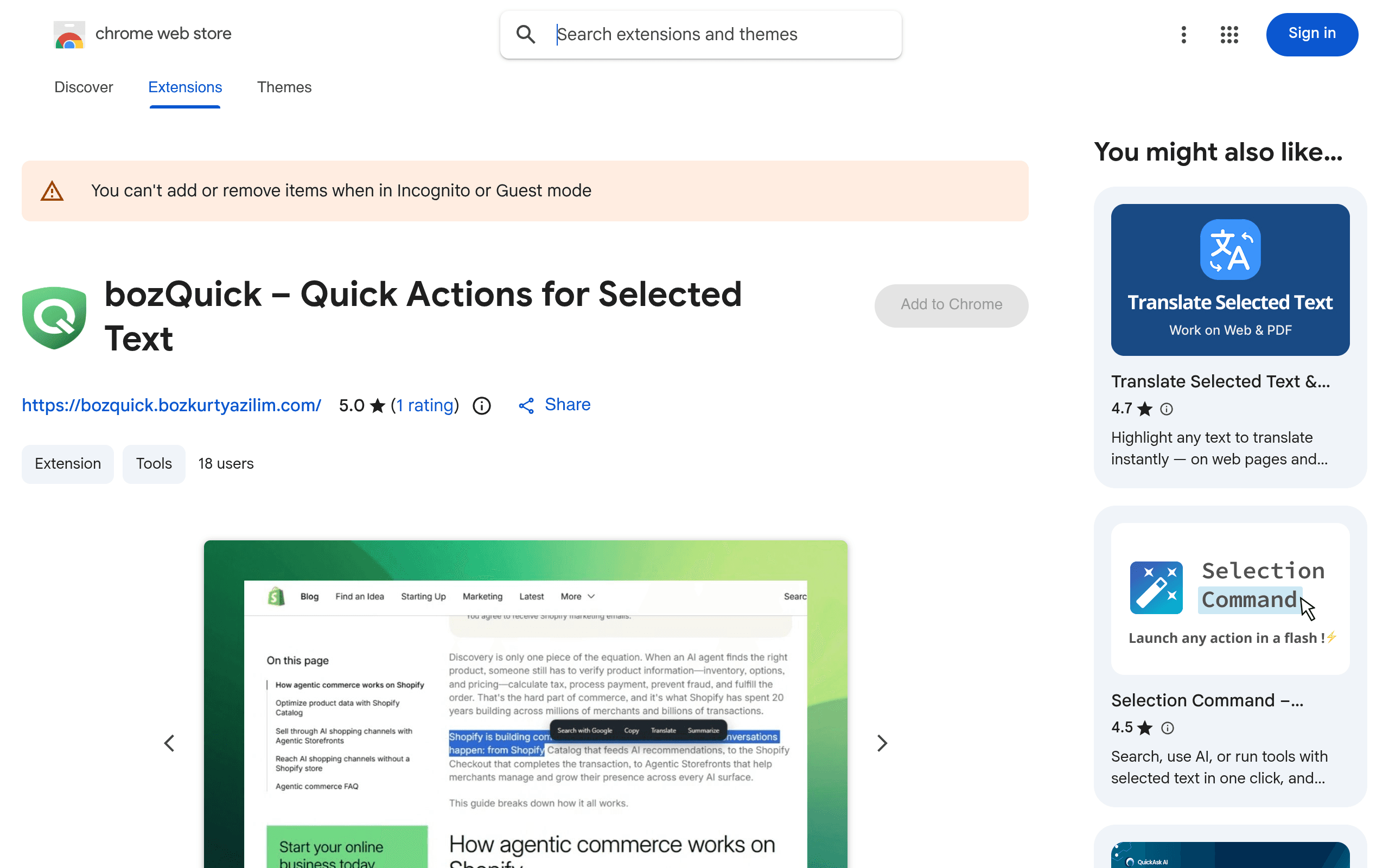
What bozQuick actually does
bozQuick is a Chrome extension that hooks into the text-selection event on any webpage. Highlight a word, sentence, or paragraph, and a small configurable action menu pops up next to your cursor. From that menu you can fire off a web search, copy the text, translate it, or send it to an AI model — all without switching tabs, opening a sidebar, or right-clicking through a nested context menu.
The pitch is speed: instead of copying text, alt-tabbing to ChatGPT, pasting, and typing a prompt prefix, you select the text once and click a preset action. It's a utility extension, not a standalone AI product — it's a router that sends your selected text to services you already have accounts with.
How it's set up
After installing from the Chrome Web Store, bozQuick's options page lets you configure three categories of actions:
- Search engines — add any search engine by URL pattern (Google, Bing, DuckDuckGo, Google Scholar, or something niche like a company wiki search).
- Translation — choose DeepL (requires your own DeepL API key) or on-device translation (uses Chrome's built-in local translation, no key, no network call, works offline).
- AI actions — connect OpenAI or OpenRouter using your own API key, then define custom prompt templates (e.g., "Explain this," "Rewrite formally," "Summarize in 3 bullets") that get applied to whatever text you selected.
Everything — your API keys, action definitions, and menu order — is stored in Chrome's local storage on your device. There's no account creation, no login, and per the extension's listing, no cloud sync and no telemetry. That also means your setup doesn't follow you to a second machine; you configure it separately on every device.
Pricing: the extension is free, the backends aren't
bozQuick itself costs nothing and has no paid tier, subscription, or upsell inside the extension. The real cost structure lives in the third-party services you plug into it:
| Component | Cost |
|---|---|
| bozQuick extension | Free, no limits |
| On-device translation | Free (uses Chrome's local model) |
| DeepL API (Free plan) | Free up to 500,000 characters/month |
| DeepL API (Pro) | From ~$5.49/month + usage-based fees for higher volume |
| OpenAI API (e.g., gpt-4o-mini) | ~$0.15 per 1M input tokens, ~$0.60 per 1M output tokens (pay-as-you-go) |
| OpenRouter | Pay-as-you-go, varies by model; many free/low-cost models available |
For light use — a few dozen translations or AI lookups a day — you can realistically stay on free tiers (on-device translation plus a free-tier OpenRouter model) and pay $0. Heavier daily AI usage through OpenAI's API might run a few dollars a month, billed directly by OpenAI, not by bozQuick.
Concrete use cases
- Reading research papers or long articles: select a dense paragraph, hit your "Explain this" AI action, get a plain-language summary in a popup without leaving the PDF or page.
- Cross-language browsing: select a foreign-language product review or forum post, run on-device translation instantly, no API key or cost.
- Quick fact-checking while reading: select a claim or name, fire a Google Scholar or DuckDuckGo search action to open results in a new tab.
- Email and doc editing: select an awkward sentence in Gmail or Google Docs, run a "Rewrite formally" AI action tied to your own OpenAI key.
- Customer support / research work: define a custom action that sends selected text plus a fixed prompt ("Categorize this ticket as bug/feature/question") to an AI model for triage.
How it compares
| bozQuick | Grammarly | DeepL Browser Extension | ChatGPT for Google | |
|---|---|---|---|---|
| Price | Free (bring your own API keys for AI/DeepL) | Free tier; Premium $12–$30/month depending on plan | Free; Pro plans from $8.74/month for higher usage | Free; optional ChatGPT Plus $20/month for GPT-4-class models |
| Core function | Configurable quick-action menu for any selected text (search, copy, translate, AI) | Grammar, tone, and clarity checking as you type | Inline translation popup and full-page translation | Injects ChatGPT answers alongside Google search results |
| AI integration | Yes — OpenAI or OpenRouter, fully custom prompts you define | Limited — built-in AI rewrite/tone suggestions, not general-purpose | No | Yes — but locked to ChatGPT specifically, not customizable providers |
| Data handling | Local storage only, no account, no cloud sync | Cloud-based, requires account, text sent to Grammarly's servers | Text sent to DeepL's servers for translation | Text/queries sent to OpenAI's servers |
| Customization | High — define your own engines, prompts, and menu layout | Low — fixed feature set | Low — translation only | Low — fixed to search-result sidebar |
| Best for | People who already have API keys and want one fast menu for search/translate/AI | Writers who want continuous grammar and tone checking | Casual users who just need quick page/text translation | Google searchers who want an AI answer alongside results |
Where it falls short
bozQuick assumes you're comfortable generating and pasting in your own API keys — there's no managed AI backend, so if you don't already have an OpenAI or OpenRouter account, there's a setup step before the AI features work at all. It also doesn't sync across devices, so a work laptop and a home desktop need separate configuration. And because it's a general-purpose router rather than a specialized tool, it won't out-perform Grammarly at grammar checking or DeepL's dedicated extension at translation quality — it's valuable specifically because it puts several tools behind one selection gesture, not because any single function is best-in-class.
Verdict
If you already pay for or use OpenAI, OpenRouter, or DeepL and find yourself constantly copy-pasting selected text into other tabs, bozQuick removes that friction for $0 extra cost beyond what you're already spending on API usage. If you don't have API keys and don't want to manage them, the on-device translation and search-engine actions alone are still useful, and cost nothing. It's not a replacement for Grammarly's continuous writing checks or ChatGPT's full chat interface — it's a fast dispatcher for text you've already selected, and for that narrow job it's free, private, and quick to set up.