Emailcampaigns.eu for WooCommerce: First Look at the New EU-Based Store Sync Plugin
Some links in this guide are affiliate links. If you sign up through them, Day Zero Guides may earn a commission at no extra cost to you. This never affects which products we cover or what we say about them. See our affiliate disclosure for details.
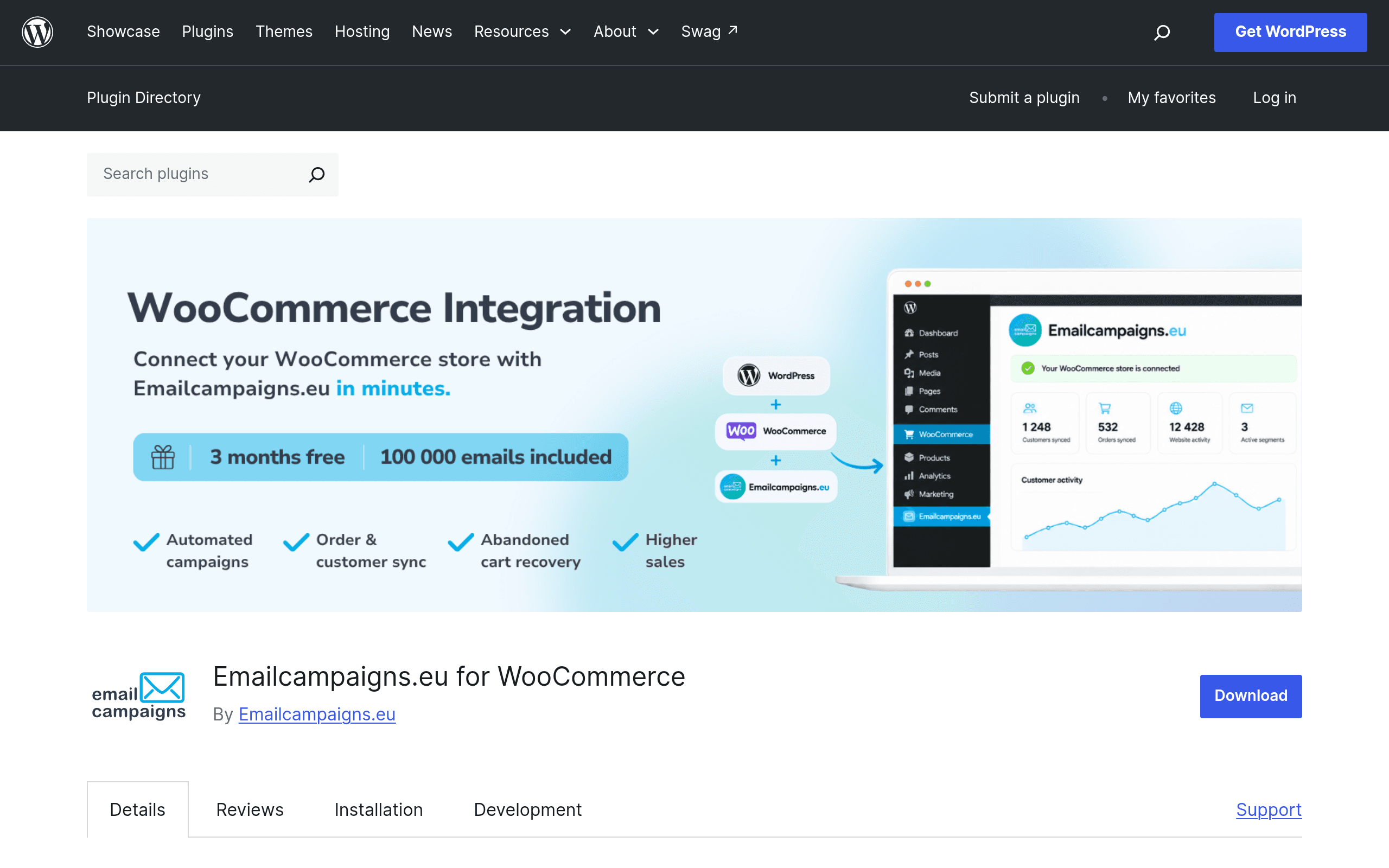
What Emailcampaigns.eu Actually Does
Emailcampaigns.eu for WooCommerce is a WordPress plugin that connects your WooCommerce store directly to the Emailcampaigns.eu marketing platform. Instead of exporting customer and order CSVs by hand, the plugin pushes orders, customer records, and cart activity to the platform automatically, then lets you build segments and automated flows on top of that live data.
If you've used Klaviyo or Omnisend's WooCommerce integrations before, the concept will feel familiar: install a plugin, authenticate an account, and your store's commerce data becomes queryable inside an email tool. The pitch here is being a lighter, EU-hosted alternative aimed at store owners who want data processed in Europe rather than through a US-based platform.
Setup, in Practice
Installing it is a standard WordPress plugin flow — search "Emailcampaigns.eu" in Plugins > Add New, activate, then connect your store to an Emailcampaigns.eu account (you create one during setup if you don't have one). Once connected, the plugin runs an initial bulk sync of existing customers and historical orders, which is the part that matters most for established stores — you're not starting your segmentation from zero, you get your existing customer list and purchase history into the platform on day one.
After the initial sync, it tracks ongoing store events: new orders, updated customer profiles, and cart abandonment. That real-time layer is what powers the automation features.
Core Features
- Abandoned cart recovery — triggers a sequence when a shopper adds to cart but doesn't check out, using the actual cart contents (product names, images, prices) rather than a generic reminder.
- Segmentation on live store data — build segments by purchase history, total spend, product categories bought, or recency, without re-exporting anything.
- Personalization — merge fields pull from real order and customer data (name, last purchased product, order total) into campaign content.
- AI-assisted content creation — generates draft subject lines and email copy based on store/product data, meant to cut down blank-page time when building a campaign.
- Bulk customer synchronization — a one-time or repeatable full sync pass, useful if you've been running the store for years and have a large existing customer base with no clean list currently in an ESP.
Pricing: What's Actually Published
This is the part to go in with clear eyes on. As of this plugin's WordPress.org listing, Emailcampaigns.eu offers 3 months free with up to 100,000 emails included, but the plugin page does not publish what happens after that trial period — no visible tiered pricing table, no per-contact rates, no overage costs listed. You'll need to get into the platform's own account dashboard or contact them directly to see what a paid plan costs once the trial months and email allotment run out.
For a store deciding today, that's a real gap. 100,000 emails over three months is a generous trial for small-to-mid stores, but you're effectively trialing blind on long-term cost. Compare that to Klaviyo and Omnisend, where free-tier limits and paid-tier pricing are public and calculable before you connect anything.
How It Compares
| Emailcampaigns.eu | Klaviyo | Omnisend | Drip | |
|---|---|---|---|---|
| Starting price | Free for 3 months, up to 100,000 emails; pricing after trial not published | Free up to 250 contacts; paid from ~$20/mo (500 contacts) | Free up to 250 contacts/500 emails/mo; Standard from $16/mo, Pro from $59/mo | From $39/mo for up to 2,500 contacts, no free tier |
| Data hosting | EU-based processing (main differentiator) | US-based (SOC 2, GDPR-compliant processing available) | US/EU data centers available | US-based |
| WooCommerce sync depth | Orders, customers, cart activity, bulk historical sync | Deep native integration, real-time events, predictive analytics | Native integration with pre-built automation workflows | Native integration, strong on tagging/behavior-based flows |
| AI content tools | AI-assisted subject lines/copy generation | AI subject line and content generation on higher tiers | Limited AI copy assist | No built-in AI content generation |
| Best for | EU-based or GDPR-cautious stores wanting a lighter, cheaper-on-paper entry point | Larger stores wanting predictive segmentation (LTV, churn risk) and deep analytics | Small-to-mid stores wanting affordable, easy-to-build automation | Stores prioritizing behavior-based tagging and complex conditional flows |
Concrete Use Cases Where This Fits
- A 3-year-old WooCommerce store with 5,000+ customers and no current ESP. The bulk customer sync means you're not starting segmentation from a blank list — history and past order value come in immediately.
- An EU-based merchant who needs to keep customer data processing inside Europe for internal policy or client assurance reasons, without going through a US-headquartered platform's EU data-residency add-on.
- A store that's been manually exporting CSVs to Mailchimp or a generic ESP and wants cart abandonment and order-based triggers without building that pipeline by hand.
- A shop testing whether abandoned-cart recovery moves the needle at all before committing budget — the 100,000-email, 3-month free window is enough runway to run a full recovery sequence test across a few months of traffic.
Where I'd Hesitate
- No visible pricing beyond the trial. If your store sends more than 100,000 emails in three months or you want to budget 12 months out, you can't do that math from the plugin page alone.
- It's new — this listing doesn't have the multi-year track record, third-party integration ecosystem (Zapier, Shopify multi-store support, SMS add-ons), or deliverability reputation data that Klaviyo and Omnisend have built up over years of WooCommerce and Shopify usage.
- If you're already deep into Klaviyo's predictive analytics (CLV, churn prediction) or Drip's visual workflow builder, migrating for EU hosting alone may not be worth the rebuild.
Verdict
Worth trying today if you're EU-based, currently have no ESP connected to WooCommerce, and want to test cart recovery and segmentation without spending anything for three months. Hold off, or at least ask sales for post-trial pricing in writing first, if you're a higher-volume store that will blow past 100,000 emails before the trial ends — you don't want to build automations around a platform you can't yet price out long-term.