Finio: Personal Finance — First Look at the Privacy-First, On-Device Budgeting App for iPhone and iPad
By Day Zero Guides Editorial · How we produce guides
Some links in this guide are affiliate links. If you sign up through them, Day Zero Guides may earn a commission at no extra cost to you. This never affects which products we cover or what we say about them. See our affiliate disclosure for details.
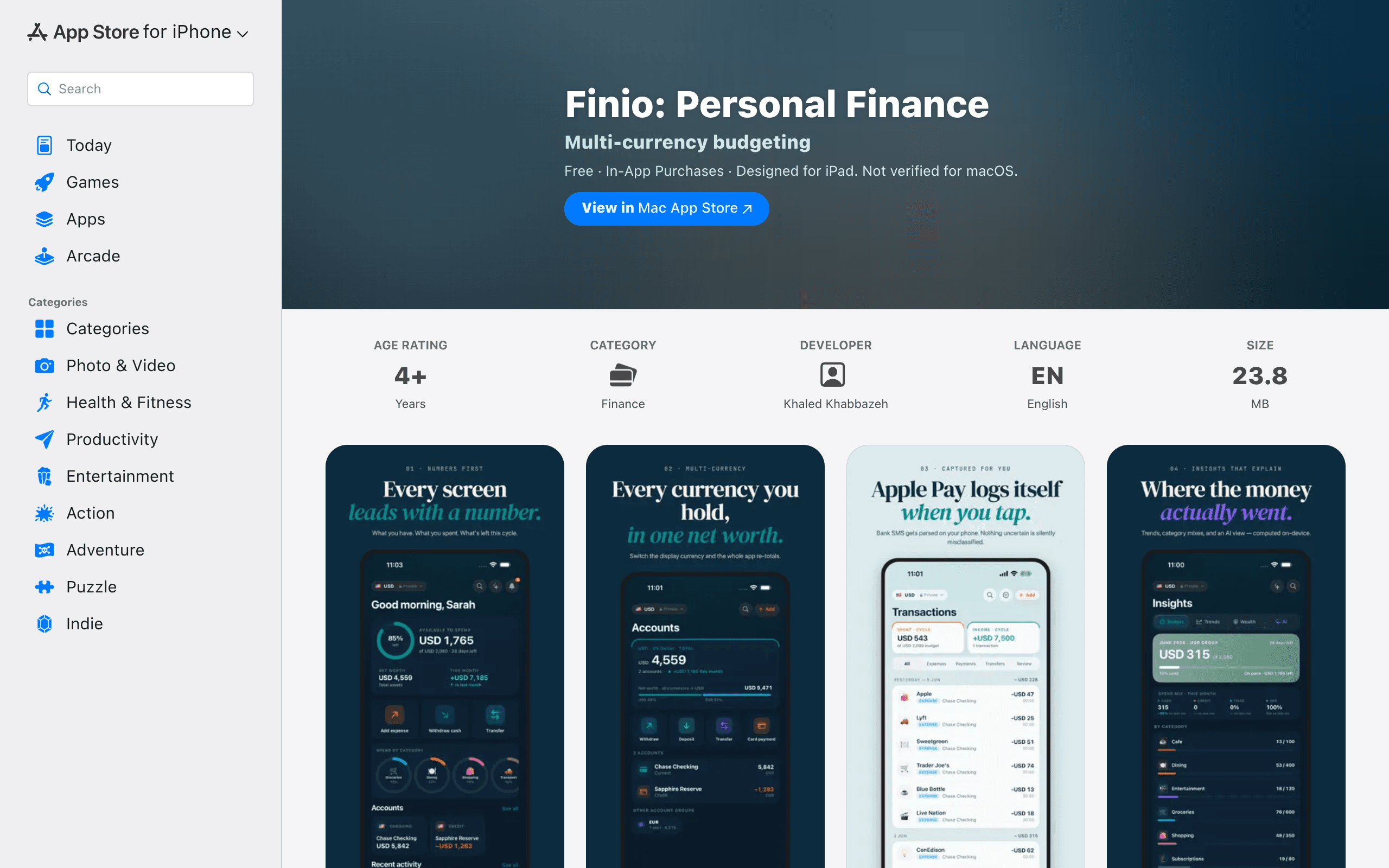
Concrete Use Cases
- A freelancer billing in two currencies: Someone invoicing US clients in USD while living and spending in euros can use two currency groups to keep true net worth and cash flow visible without manual conversion math.
- A couple merging finances without merging Apple IDs: Household Pro lets partners each keep their own device/Apple account but see a shared budget — useful for couples who've been stuck exporting CSVs between apps.
- Someone who's been burned by data-breach headlines: If the idea of a budgeting app storing your linked bank credentials on a third-party server (as Plaid-based apps do) is a dealbreaker, Finio's on-device-only model is the actual differentiator, not just a privacy-policy footnote.
- Frequent travelers tracking a travel card separately: The three-currency-group cap is enough for a home currency, a travel card, and one side account, but not much more — a limitation to know going in.
What Finio Actually Is
Finio is a budgeting and net-worth tracking app built exclusively for iPhone and iPad that makes one core architectural bet: no cloud backend. Every transaction, account balance, and budget category lives in local storage (synced only via your own iCloud account if you choose), which means Finio never sees your financial data on a company server. That's a meaningfully different pitch than most budgeting apps in 2024–2025, most of which route your bank feeds through Plaid or a similar aggregator.
Instead of live bank-account linking, Finio leans on two capture methods: automatic transaction detection from Apple Pay transactions and parsing of SMS payment notifications (useful in regions where banks text you every charge). You can also add transactions manually, and the app supports up to three separate currency groups, so someone with a checking account in USD, a freelance client paying in EUR, and a travel card in GBP can track all three without jury-rigging conversion spreadsheets.
The household feature lets a partner or family share one budget view without both people needing the same Apple ID — a real gap in a lot of iOS-only finance apps that assume single-user households.
What's Genuinely New Here
The headline feature is Apple Intelligence integration for spending insights — Finio uses on-device AI (when available on supported hardware/OS versions) to surface patterns like recurring subscriptions, category overspending, or unusual transactions, all without sending data out for processing. If Apple Intelligence isn't available on your device or region, the app reportedly falls back to standard rule-based insights, so functionality doesn't fully disappear on older hardware — but the marquee feature does.
Pricing Breakdown
Finio uses a freemium model with two paid tiers, each offered monthly or annually:
| Tier | Monthly | Annual | Who it's for |
|---|---|---|---|
| Free | $0 | $0 | Basic tracking, limited accounts/currency groups |
| Single Pro | $6.99/mo | $59.99/yr | One user, full feature set, all 3 currency groups |
| Household Pro | $11.99/mo | $99.99/yr | Shared budget across a household, multiple members |
The annual plans work out to roughly $5/month for Single Pro and $8.33/month for Household Pro — a fairly standard ~28% discount for committing yearly. There's no lifetime/one-time purchase option, which is worth noting if you're comparing against apps that do offer that (like MoneyMoney, below).
Where It Falls Short (So Far)
- No direct bank-feed linking (Plaid-style) means transaction capture depends on Apple Pay usage or SMS parsing — if you pay by physical card swipe with no SMS receipt, you're manually entering transactions.
- iOS/iPadOS only — no web app, no Android, no Mac app (as of this writing), which rules it out for mixed-platform households.
- Apple Intelligence features require supported hardware and OS versions, so the