KB External Store Buttons for WooCommerce: First Look at the New Multi-Marketplace Button Plugin
Some links in this guide are affiliate links. If you sign up through them, Day Zero Guides may earn a commission at no extra cost to you. This never affects which products we cover or what we say about them. See our affiliate disclosure for details.
What it actually does
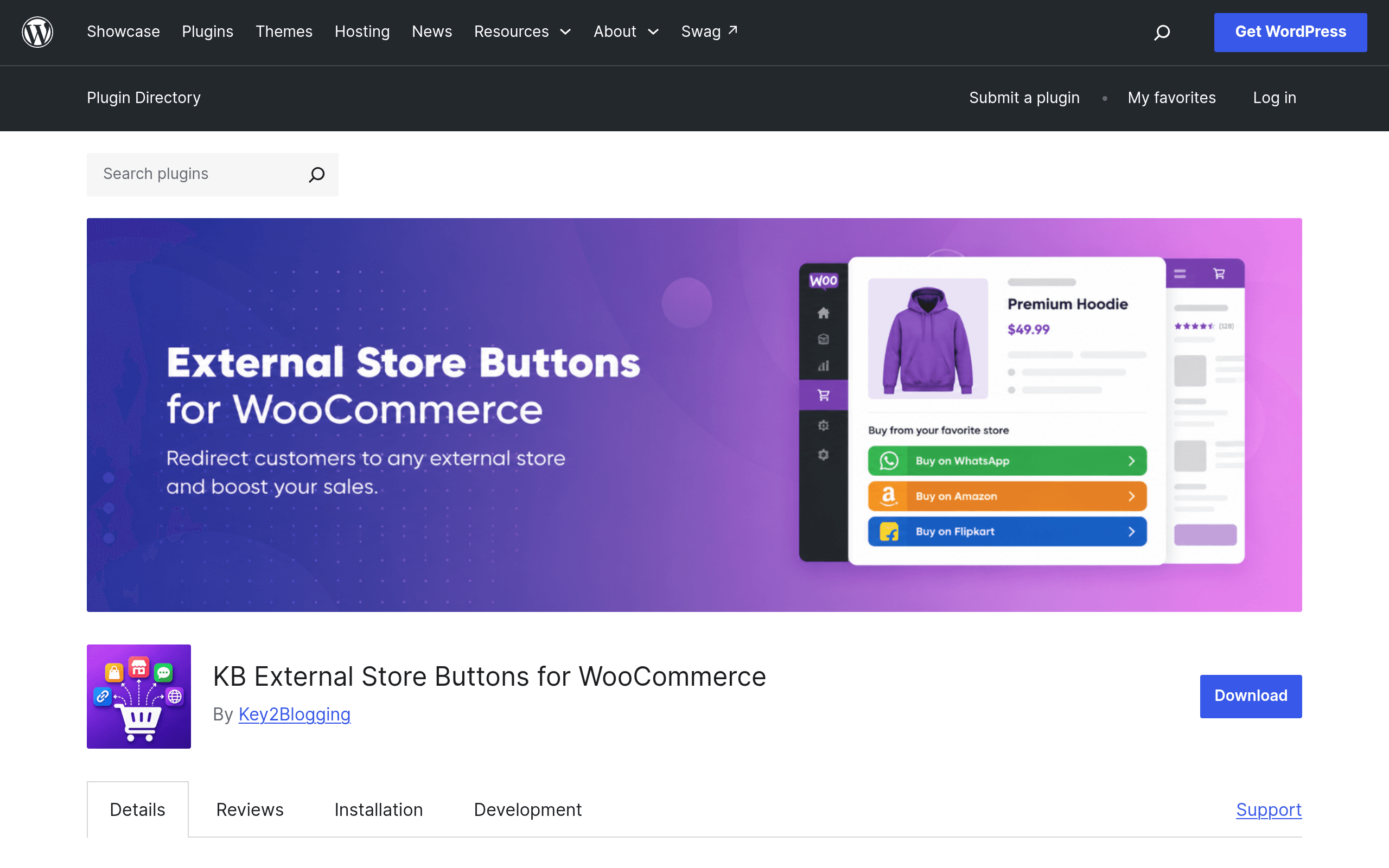
KB External Store Buttons for WooCommerce is a small, single-purpose plugin that does one thing: it lets you replace (or sit alongside) the default WooCommerce "Add to Cart" button with one or more buttons that send shoppers off to an external destination — an Amazon listing, a Flipkart page, a WhatsApp chat, or any marketplace you define yourself.
If you've ever run a WooCommerce catalog where you don't actually fulfill orders through WooCommerce — because you're really driving traffic to Amazon for reviews and Prime shipping, taking orders over WhatsApp, or listing the same SKU on three different marketplaces — this plugin is built for exactly that gap. WooCommerce assumes you want a cart and a checkout. This plugin assumes you just want a button that goes somewhere else.
Core features
- Marketplace Manager — a settings screen where you define reusable "marketplaces" (name, icon/logo, button color, default label) instead of hardcoding button text on every product.
- Per-product URL configuration — each product gets its own destination URL for each marketplace you've enabled, so the same "Buy on Amazon" button can point to a different ASIN per product.
- Variable product support — you can assign different external URLs per variation (size, color, etc.), not just per parent product.
- Replace-or-supplement mode — you choose whether the external buttons replace the native Add to Cart button entirely or appear next to it, which matters if you still sell some inventory directly through WooCommerce checkout.
- Custom marketplace buttons — beyond the obvious Amazon/Flipkart/WhatsApp presets, you can add any marketplace (Etsy, eBay, a regional store, a booking link) with its own label and icon.
Pricing
The plugin is listed on the official WordPress.org plugin repository, which means the version available today is free to download and use — there's no published pricing page, paywall, or license key anywhere in the listing at the time of writing. There's also no visible "Pro" upsell, add-on bundle, or SaaS dashboard mentioned in the plugin description, which is somewhat unusual for a WooCommerce extension in 2024–2025; most comparable tools ship a free core with a paid tier for advanced fields, analytics, or multi-marketplace limits. Whether that changes as the plugin matures is worth watching, but as of this first look, budget $0 to try it.
Concrete use cases
- A skincare brand selling on their own WooCommerce site and on Amazon. They want to show inventory on their own storefront for brand credibility and SEO, but actually route the "Buy Now" click to their Amazon listing to capture Prime shipping and existing reviews. KB External Store Buttons handles this per-product without touching theme templates.
- A furniture importer selling the same catalog on Flipkart in India and WooCommerce for direct-to-consumer. Using the Marketplace Manager, they set up an "Available on Flipkart" button globally, then paste the specific Flipkart product URL into each product's settings.
- A boutique that takes custom orders via WhatsApp instead of checkout. Instead of building a cart flow for made-to-order items, they replace Add to Cart with a WhatsApp button pre-filled with the product name, so inquiries land directly in the shop owner's chat.
- A multi-variant apparel store listing different colorways on different third-party marketplaces. Because variable product support is built in, a red variant can link to one Amazon ASIN and a blue variant to another, without needing separate parent products.
How it compares
| KB External Store Buttons for WooCommerce | Variation Swatches for WooCommerce | WooCommerce Product Recommendations | LooseSchedule External Links for WooCommerce | |
|---|---|---|---|---|
| Price | Free (WordPress.org, no published pro tier) | Free core; premium tiers from most swatch plugins in this space run ~$29–$49/year | $79/year (official WooCommerce.com extension) | Free (WordPress.org) |
| Core job | Replace/add external marketplace buttons per product or variation | Turn dropdown variation selectors into color/image/button swatches | Show "customers also bought" / cross-sell and upsell blocks | Turn WooCommerce products into external affiliate/marketplace links |
| Multi-marketplace support | Yes — unlimited custom marketplaces via Marketplace Manager | No — not its purpose | No — not its purpose | Limited — typically one external URL per product, no marketplace branding/manager |
| Variable product handling | Per-variation external URLs | Per-variation swatch display, not URL routing | N/A | Generally product-level only |
| Best for | Stores that fulfill off-platform (Amazon, Flipkart, WhatsApp, custom) | Stores that fulfill in WooCommerce but want a better variant picker UI | Stores that fulfill in WooCommerce and want to increase average order value | Simple single-destination affiliate or dropship product links |
The honest read: Variation Swatches and Product Recommendations solve completely different problems (UI polish and cross-selling) and aren't real substitutes — they're only here because they get grouped with WooCommerce "button" and "external product" plugins in searches. The closer competitor is LooseSchedule External Links, which covers similar ground but without a dedicated Marketplace Manager, branded multi-marketplace buttons, or per-variation URLs — those three things are KB External Store Buttons' actual differentiators.
Setup notes and rough edges
Installation is standard WordPress.org fare: search "KB External Store Buttons for WooCommerce" from Plugins > Add New, activate, and a new settings section appears under WooCommerce for the Marketplace Manager. You'll want to set up your marketplaces (icons, labels, colors) before touching individual products, since the per-product screen just lets you fill in URLs for marketplaces that already exist.
A few things worth checking before you commit a catalog to it: as a newly listed plugin, it doesn't yet have a long changelog or a large installed base to judge long-term compatibility against theme builders (Elementor, Divi) or page-level product blocks — test on a staging site with your actual product templates first. There's also no built-in analytics for tracking which external button gets clicked most, so if attribution matters to you, pair it with your existing outbound-link tracking (Google Analytics event tracking or a link-tracking plugin) rather than expecting it out of the box.
Should you try it today?
If your WooCommerce store's real job is to be a catalog and traffic router — not a checkout — this plugin removes a genuinely annoying gap: WooCommerce doesn't have a clean native way to say "buy this specific variant on Amazon instead." Because it's free with no license wall, there's very little downside to installing it on a staging site this afternoon and testing it against two or three of your actual products, including at least one variable product, before deciding whether it replaces whatever workaround (custom fields, a page builder button, a redirect plugin) you're using now.