PinoyTrade Product Scanner Lite: First Look at the Free WooCommerce Barcode Scanner That Skips the Cloud
Some links in this guide are affiliate links. If you sign up through them, Day Zero Guides may earn a commission at no extra cost to you. This never affects which products we cover or what we say about them. See our affiliate disclosure for details.
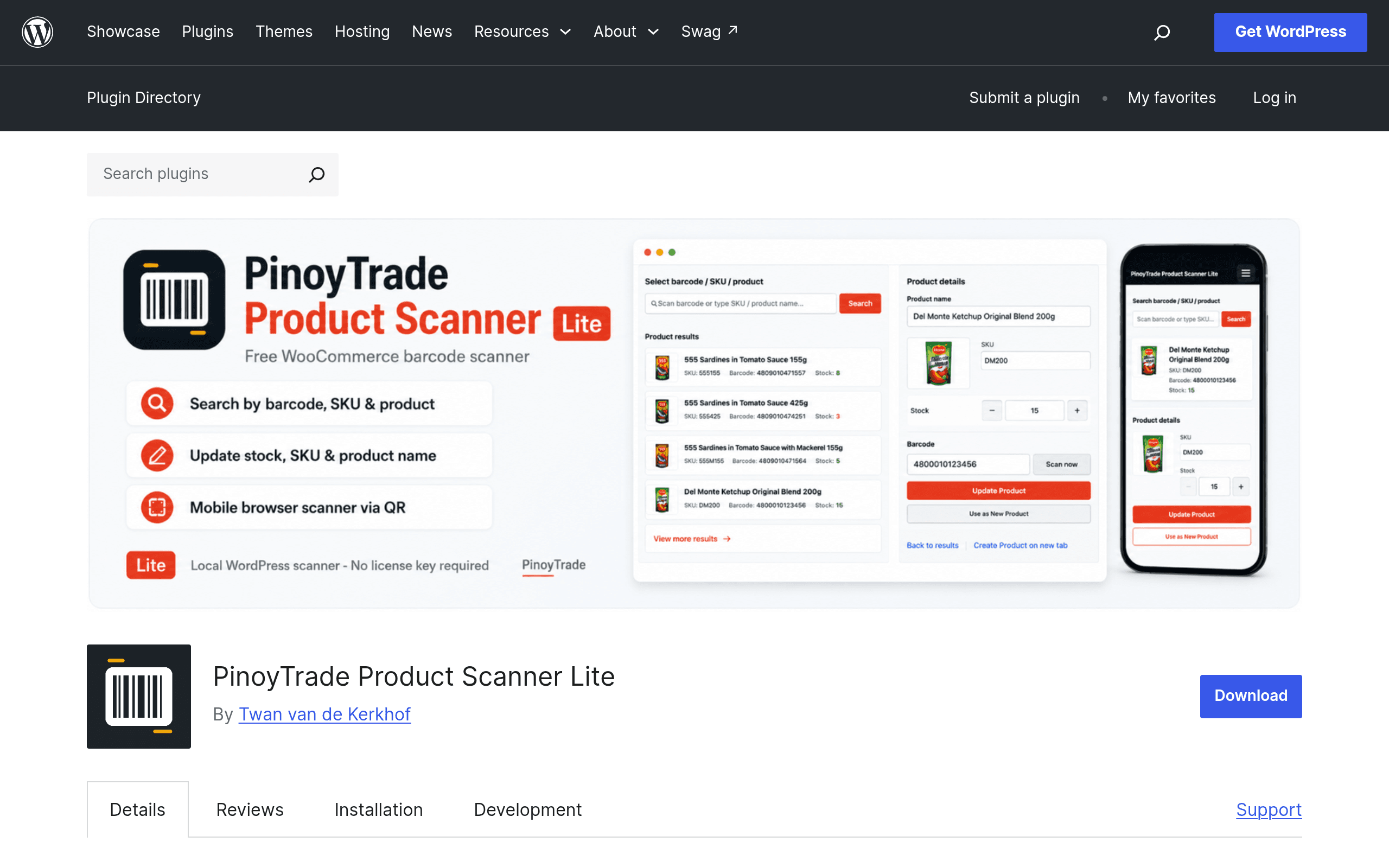
What PinoyTrade Product Scanner Lite actually does
PinoyTrade Product Scanner Lite is a free plugin listed on WordPress.org that adds barcode scanning to a WooCommerce store's admin area. Instead of typing a SKU into search boxes to find a product, you point a phone or webcam at a barcode using the browser's camera (no separate scanner hardware required), and the plugin looks up the matching product in your WooCommerce catalog.
Once it finds a match, you can view and edit three things directly from the scan result: product name, SKU, and stock quantity. That's the entire feature set of the Lite version — it's deliberately narrow. There's no pricing editor, no bulk import, no external syncing in the free tier.
The detail that matters most for a lot of small merchants: everything is stored locally inside your WordPress database. There's no API call to a third-party barcode lookup service, no analytics ping, no cloud dashboard you have to log into. If you run a store where you don't want scan data or inventory activity leaving your own server, this is the plugin's actual selling point over flashier competitors.
Pricing
- Lite (free) — barcode scanning via browser camera, product lookup, and manual edits to name/SKU/stock. Distributed through the WordPress.org plugin repository, so installation is the standard one-click process from your wp-admin Plugins screen.
- Pro (paid upgrade) — adds CSV import/export, Zettle (PayPal's POS system) sync, bulk price updates, a native mobile app instead of relying on a mobile browser, and REST API access for connecting to external inventory or POS tools. As of this writing, PinoyTrade has not published a fixed price for Pro on the plugin's WordPress.org listing or an obvious pricing page — check the plugin's own site or the "Upgrade to Pro" prompt inside the Lite dashboard for current numbers before budgeting for it.
If you only need the barcode-to-product-lookup workflow, the free tier is fully functional on its own and isn't a crippled trial — the core scanning and editing features work without nagging for upgrade prompts on every screen.
Concrete use cases
- A sari-sari store or small retail shop digitizing paper stock counts. Instead of writing SKU numbers on a clipboard during a physical inventory count, staff scan each product with a phone, see current stock on screen, and correct it on the spot.
- A warehouse receiving shipment and needing quick SKU verification. Scan the barcode on an incoming box, confirm it matches the SKU already in WooCommerce, and catch mislabeled stock before it goes on the shelf.
- A store owner who doesn't want a third-party service touching inventory data. Because there's no cloud sync in Lite, this fits privacy-conscious sellers or anyone in a jurisdiction where sending customer/inventory data to outside servers raises compliance concerns.
- Testing whether barcode workflows are worth it before paying for anything. Because it's free and only needs a WooCommerce install to test, it's a low-risk way to see if your team will actually use scanning before buying a Pro plan or a competitor's paid plugin.
What it's not good for: multi-location stock transfers, syncing with a physical POS terminal, bulk-editing hundreds of SKUs at once, or anything requiring the mobile app / API — all of that sits behind the Pro upgrade.
How it compares
| PinoyTrade Product Scanner Lite | Barcode Master for WooCommerce | WooCommerce Barcode Scanner | Cloudinary Product Scanner | |
|---|---|---|---|---|
| Price (entry tier) | Free, with paid Pro upgrade for sync/API/app | Free core plugin, paid add-ons for advanced label/print features | Free on WordPress.org | Requires a Cloudinary account; free tier is limited by Cloudinary's usage quotas |
| Data storage | 100% local, no external service calls | Local, with optional add-ons that touch external label services | Local | Routes images/data through Cloudinary's cloud infrastructure |
| Editable fields via scan | Name, SKU, stock | SKU, stock, plus barcode generation/printing | SKU and stock lookup | Product image and metadata scanning, less focused on stock edits |
| Mobile app | Not in Lite; native app is Pro-only | No dedicated app; browser-based | No dedicated app; browser-based | Depends on Cloudinary's own mobile tooling |
| Best for | Privacy-conscious small stores wanting simple local lookups | Stores that need to print their own barcode labels alongside scanning | Stores wanting a no-frills, free scan-and-check tool | Stores already using Cloudinary for media who want scanning bolted onto that workflow |
The honest read: PinoyTrade Lite and WooCommerce Barcode Scanner occupy similar territory — free, simple, local. PinoyTrade's edge is explicitly marketing "no cloud, no tracking," which the others don't foreground the same way. Barcode Master pulls ahead if you need to generate and print your own barcode labels, which PinoyTrade doesn't do at all. Cloudinary's tool is a different animal entirely — it's for stores already invested in Cloudinary's media pipeline, not a direct swap-in for simple stock scanning.
Should you install it today
If you run a small-to-mid WooCommerce store and want to stop manually typing SKUs to check stock, installing the free Lite version costs you nothing but a few minutes and a plugin slot. It does one job — scan, look up, edit three fields — and does it without phoning home to a third-party server. The catch is that Pro pricing isn't transparent yet, so don't commit to it expecting CSV import or Zettle sync until you've confirmed what Pro actually costs. For now, treat this as a free, single-purpose inventory-checking tool rather than a full barcode management system.