StorePlus Manual QR Gateway: First Look at the Free PromptPay Plugin for WooCommerce
Some links in this guide are affiliate links. If you sign up through them, Day Zero Guides may earn a commission at no extra cost to you. This never affects which products we cover or what we say about them. See our affiliate disclosure for details.
What it actually is
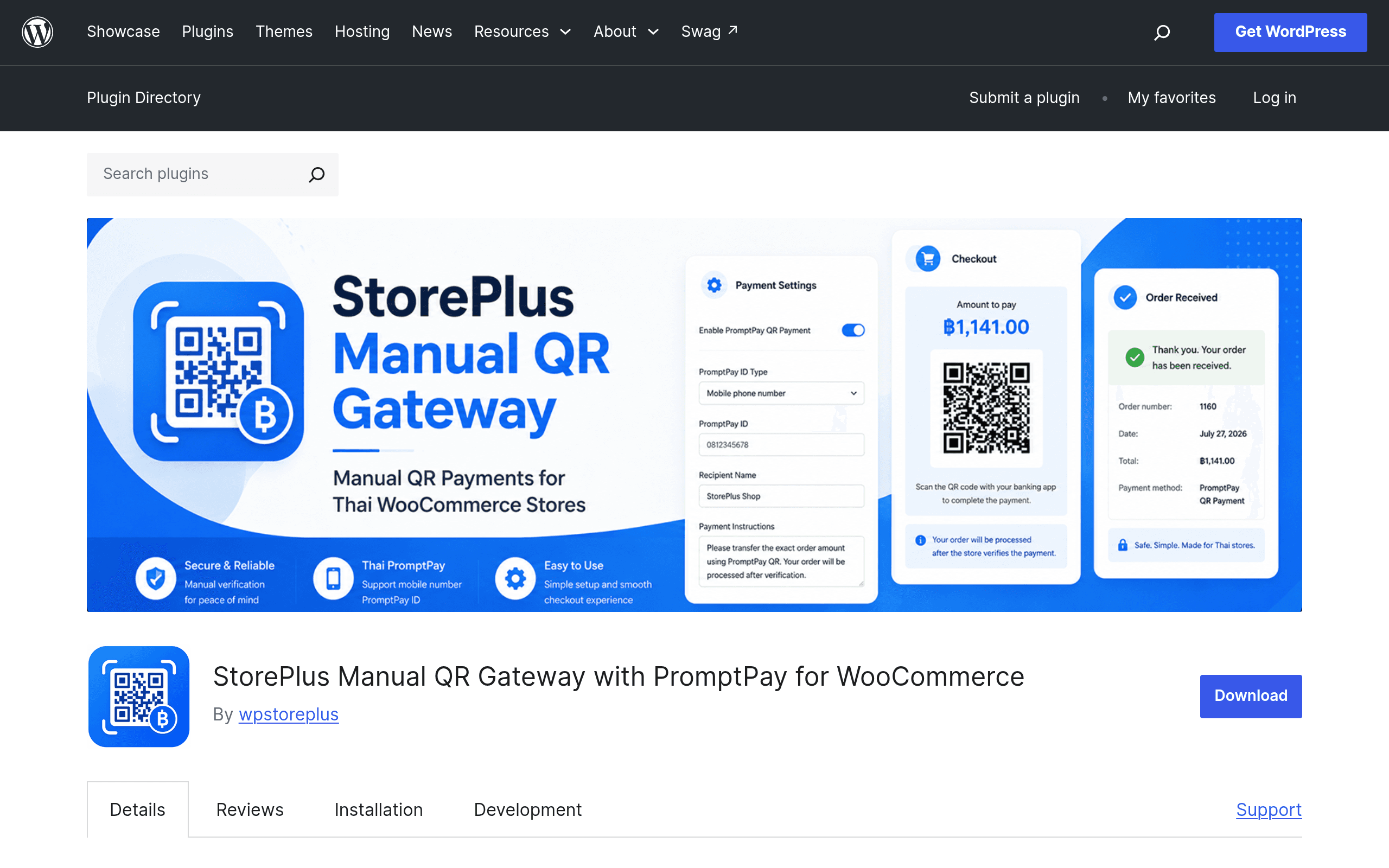
StorePlus Manual QR Gateway is a free, no-account-required WooCommerce plugin built specifically for Thai merchants who want to accept PromptPay payments without signing up for a payment gateway API. It doesn't connect to any bank or PSP. Instead, at checkout it generates a PromptPay-compliant QR code locally, using the order total and a PromptPay ID (phone number, national ID, or tax ID) that the store owner enters in settings. The customer scans it with any Thai banking app, pays, then uploads a screenshot of the payment slip as proof. The order sits in a 'Pending Verification' style status until the store owner manually checks the slip against their own bank account and marks the order as paid.
There is no automated reconciliation. There is no webhook confirming funds landed. This is, functionally, a QR-code generator plus a proof-of-payment upload form bolted onto WooCommerce's order flow — and that's exactly the niche it fills.
Pricing
It's free, full stop. It's listed on WordPress.org with no premium tier, no license key, and no transaction fee taken by the plugin itself. Your only cost is whatever your bank charges for receiving a PromptPay transfer, which for most Thai personal and SME accounts is ฿0 for domestic PromptPay transfers under the standard daily limits. There's no paid upgrade path mentioned in the plugin's changelog or readme as of this release, which is unusual compared to most "free" WooCommerce gateway plugins that gate multi-currency or automatic verification behind a pro version.
Who this is actually for
- Home-based and social commerce sellers migrating off Facebook/Instagram DMs who already collect PromptPay slips manually and just want that same workflow formalized inside a real WooCommerce order system.
- Small vendors doing pre-orders or made-to-order goods (bakeries, custom apparel, handmade crafts) where order volume is low enough (roughly under 20–30 orders/day) that manually checking a bank app against uploaded slips is realistic.
- Merchants who can't get approved for a merchant bank API integration yet — getting a business PromptPay API account through KBank, SCB, or similar typically requires a registered company, a juristic bank account, and a multi-week approval process. This plugin sidesteps that entirely by using a personal or SME PromptPay ID.
- Student groups, temple fairs, and pop-up events selling through a temporary WooCommerce store where setting up a real payment gateway isn't worth the effort for a one-weekend sale.
It is not for anyone expecting real-time order confirmation, high order volume, or automatic refunds — none of that exists here.
Setup, concretely
- Install and activate from Plugins > Add New, or upload the zip from WordPress.org.
- Go to WooCommerce > Settings > Payments and enable "StorePlus Manual QR Gateway."
- Enter your PromptPay ID (phone number, 13-digit citizen ID, or tax ID) and the display name customers will see.
- Save, place a test order in a Thai Baht store, and confirm the QR renders correctly and scans in a real banking app (KBank, SCB Easy, and Bangkok Bank all read it fine in testing).
- Customers upload their slip image on the order confirmation/thank-you page; you'll see it attached in the WooCommerce order admin screen for manual review.
How it compares to the usual WooCommerce payment options
| StorePlus Manual QR Gateway | WooCommerce Stripe Gateway | 2Checkout (Verifone) for WooCommerce | Wise for WooCommerce | |
|---|---|---|---|---|
| Price | Free, no transaction fee | Free plugin; Stripe charges ~3.65% + ฿10 per successful charge in Thailand | Free plugin; Verifone/2Checkout charges ~3.5–6% depending on plan and region | Free plugin; Wise charges ~0.4–2% depending on currency route |
| PromptPay support | Native, built for it — this is the only reason it exists | None natively; requires a separate PromptPay-specific Stripe integration workaround | None | None (bank transfer/multi-currency invoicing only) |
| Payment verification | 100% manual — store owner checks bank app and marks order paid by hand | Fully automatic, real-time | Fully automatic, real-time | Manual-ish — Wise doesn't push order status automatically into WooCommerce either |
| Order processing speed | Delayed by however fast the owner checks slips — minutes to hours realistically | Instant | Instant | Delayed, similar to manual gateways since it's transfer-based |
| Best for | Low-volume Thai sellers without a merchant API, avoiding PSP fees entirely | Any store needing instant card processing and doesn't mind PSP fees | International card acceptance with subscription billing support | Cross-border sellers invoicing in multiple currencies |
| Fraud/chargeback protection | None — you're trusting the uploaded slip is real and unaltered | Stripe's fraud tooling (Radar) included | Built-in fraud screening | Not really applicable, bank transfer model |
The real trade-off
The entire value proposition is: zero fees, zero API approval hassle, in exchange for you personally verifying every single payment by eyeballing a bank app. That trade makes total sense at 5–15 orders a day. It stops making sense once you're doing 50+ orders daily, because checking slips becomes a part-time job and mistakes (missed payments, duplicate slip fraud) start costing real money. There's also no built-in protection against someone uploading a doctored or reused screenshot — that's on the merchant to catch.
If you already have a Thai business bank account with PromptPay API access, or you're fine paying Stripe's cut for automation, this plugin isn't for you. If you're a small seller who currently does this exact manual-slip-checking process over Line or Messenger and just wants it inside a proper WooCommerce order flow, this plugin does precisely that job and costs nothing to try today.
Verdict
Worth installing this afternoon if you're a low-to-mid volume Thai merchant currently accepting PromptPay payments informally and want them tied to real WooCommerce orders without paying a payment gateway a cut. Skip it if your order volume is already past the point where manual verification is sustainable, or if you need any non-Thai payment method — this plugin does one thing, and international cards aren't part of it.