Toorimichi: A First Look at the New Free WordPress Multi-Site Dashboard Plugin
Some links in this guide are affiliate links. If you sign up through them, Day Zero Guides may earn a commission at no extra cost to you. This never affects which products we cover or what we say about them. See our affiliate disclosure for details.
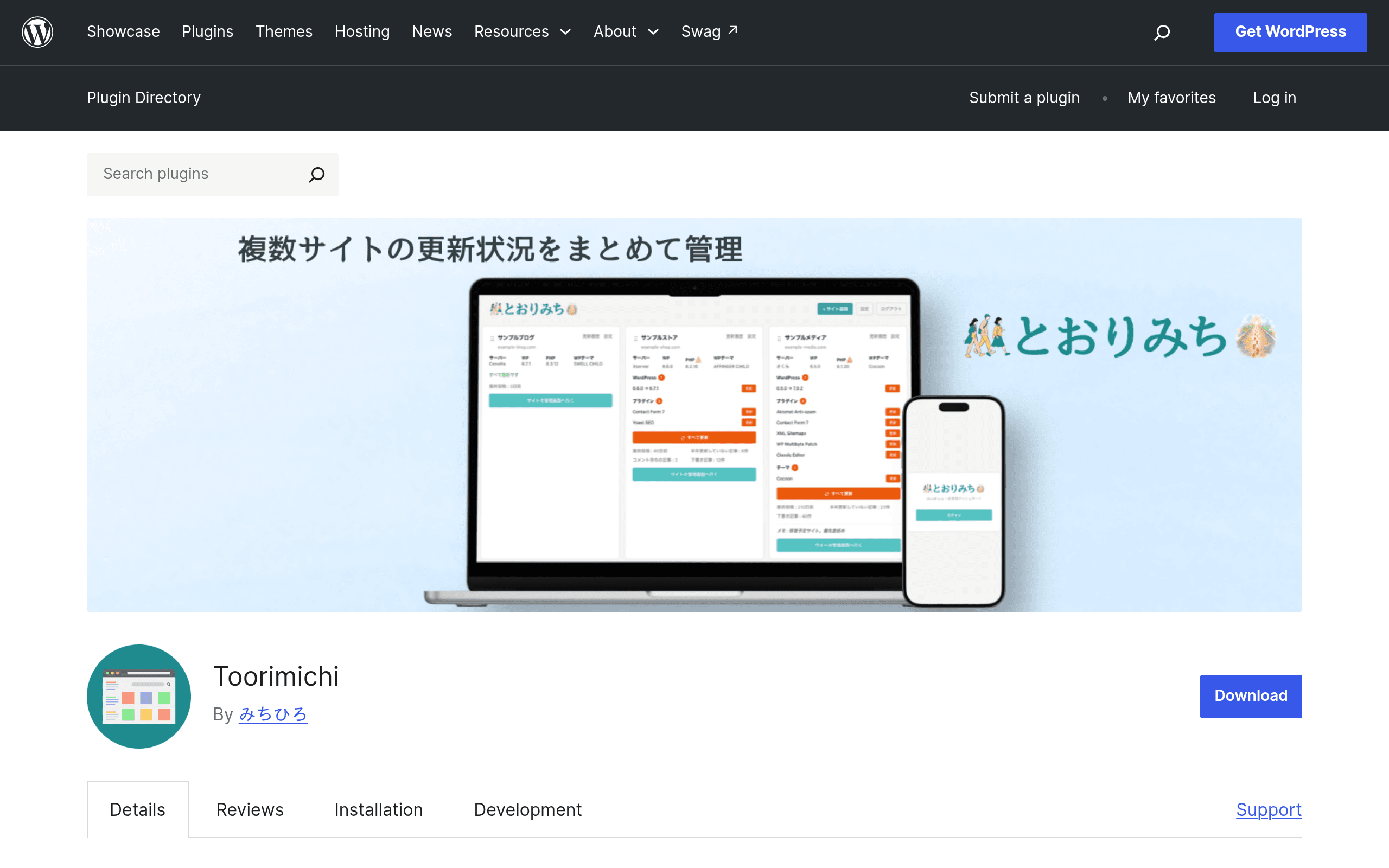
What Toorimichi Actually Is
Toorimichi is a WordPress plugin, distributed through the official WordPress.org plugin repository, that gives you a single dashboard to monitor and push updates to multiple WordPress installs. Instead of logging into each site's /wp-admin separately to check for core, plugin, and theme updates, you register your sites with Toorimichi and manage them from one screen.
That's the core pitch: fewer logins, fewer tabs, less time spent doing the same maintenance click five, ten, or thirty times over. It's aimed squarely at the person who currently manages a handful of client sites, a portfolio of niche sites, or an agency's staging/production fleet and is tired of the login-check-update-logout loop.
Because this is a brand-new listing on WordPress.org, the plugin is early in its lifecycle. That matters for how you should evaluate it today: expect a smaller feature set than established players, expect a smaller (or nonexistent) public track record of reviews, and expect the roadmap to still be forming.
Pricing: Not Published Yet
As of this writing, Toorimichi has no published pricing page, no listed pro tier, and no hosted SaaS upsell that we could find on the plugin page or elsewhere. It ships as a standard WordPress.org repository plugin, which means:
- The plugin itself is free to download and install, per WordPress.org repository rules (all code hosted there must be free to use under GPL).
- There is currently no disclosed premium version, paid add-on pack, or subscription tier.
- There's no indication yet of usage limits (e.g., a cap on number of connected sites) baked into a free vs. paid split, because no split has been announced.
If you're comparing total cost of ownership against paid competitors, the honest answer right now is: Toorimichi costs $0 to try, but you're also trying a product without a committed monetization or support model. That's worth weighing if you're planning to depend on it for client work — a free tool with no visible business model behind it can mean slower support response, or it can mean a wider commercial release is still coming. Neither is confirmed.
Concrete Use Cases
- Freelance WordPress developer with 6–15 client sites. Instead of a Monday-morning routine of opening each site's wp-admin to check for updates, you open one Toorimichi dashboard and see which sites have pending core, plugin, or theme updates.
- Agency dev doing a quick pre-invoice sweep. Before sending a monthly maintenance invoice, you scan the centralized dashboard to confirm every client site is patched, rather than trusting memory or a spreadsheet.
- Someone running a small network of niche content sites (not a WordPress Multisite network, but separate standalone installs) who wants visibility into version drift across the fleet without SSH access or WP-CLI scripting.
- A solo site owner managing 2–3 sites (a main site plus staging/dev copies) who wants one place to trigger updates instead of juggling browser tabs.
What it is not, at least in this initial release: a backup tool, a white-label client reporting platform, or an uptime/security monitor. If your workflow depends on those, you'll still need separate plugins or services alongside it.
How It Compares
| Toorimichi | ManageWP | InfiniteWP | UpdraftPlus | |
|---|---|---|---|---|
| Price | Free (no paid tier published yet) | Free tier available; paid add-ons (Backups, Client Reports, SEO Ranking, White Label) billed per site, roughly $1–$5+/site/month depending on add-ons | Free self-hosted core; premium add-ons sold as one-time or annual license bundles (roughly $50–$150+/year depending on package) | Free core plugin; UpdraftPlus Premium starts around $70/year for one site, with multi-site/agency bundles priced higher |
| Core feature | Centralized dashboard to view and execute core/plugin/theme updates across registered sites | Centralized dashboard plus backups, uptime monitoring, security scanning, and client reporting, all from one hub | Self-hosted centralized dashboard (you run the master control panel on your own server) for updates, backups, and basic monitoring | Primarily a backup and migration plugin, with scheduling to remote storage (Dropbox, S3, Google Drive, etc.); not a multi-site management hub by default |
| Backups | Not included | Included as a paid add-on | Included via add-on/package | Core function of the plugin — this is its main strength |
| Client reporting / white label | Not available | Yes, paid add-on | Limited, depends on package | No |
| Hosting model | WordPress plugin installed on each site, managed via dashboard (deployment details still emerging) | Cloud-hosted SaaS dashboard | Self-hosted — you install and maintain the master dashboard yourself | Per-site plugin; no central multi-site dashboard |
| Best for | Small operators wanting a free, no-frills update dashboard while the product matures | Agencies wanting an all-in-one paid platform with backups, reporting, and monitoring bundled together | Agencies or developers who want full control and are comfortable self-hosting the control panel | Anyone whose primary need is reliable backups and migrations, not multi-site update management |
Should You Install It Today?
If your only pain point is the repetitive click-through of checking for updates across a handful of sites, and you don't currently pay for ManageWP or InfiniteWP, there's very little downside to installing Toorimichi and testing it against your actual site list this week. It costs nothing, and the core promise — one dashboard instead of many logins — is a real, well-understood problem it's trying to solve.
Where you should hold off: if you need backups, white-labeled client reports, uptime alerts, or security scanning as part of the same tool, none of that is here yet, and you'll still need UpdraftPlus (or similar) running alongside it for backups regardless. And if you're managing dozens of client sites commercially and need guaranteed support SLAs, the lack of a published pricing or support model is a real gap compared to ManageWP's paid plans or InfiniteWP's licensed packages.
Practical first step: install Toorimichi on two or three lower-stakes sites first (a staging site, a personal blog, a low-traffic client site) before rolling it out across your full portfolio, simply because it's new enough that its long-term maintenance and update-execution reliability haven't been stress-tested by a large user base yet.
The Bottom Line
Toorimichi is a young, free, single-purpose plugin: it centralizes update-checking and update-execution across multiple WordPress sites. It doesn't yet compete feature-for-feature with ManageWP or InfiniteWP, both of which bundle backups, monitoring, and client reporting into their paid tiers, and it's not a replacement for UpdraftPlus if backups are your priority. But as a zero-cost way to cut down on repetitive wp-admin logins for update management, it's worth a trial run today — just keep your existing backup plugin running alongside it.
Update — 2026-08-19
The guide stated Toorimichi had "no published pricing page" and "no disclosed premium version," but the current website still shows it as free with no premium tier mentioned. However, the guide significantly understated the feature set—the current website lists many concrete features (post-update health checks, update history, content health, environment info, per-site notes, domain expiry display) that the guide did not detail, and the architecture has materially changed from an external-server model to a self-hosted settings vault (v0.2.0), which is a significant shift in how data is stored and operated.