Bolso Simples: First Look at the No-Frills Expense Tracker on Google Play
By Day Zero Guides Editorial · How we produce guides
Some links in this guide are affiliate links. If you sign up through them, Day Zero Guides may earn a commission at no extra cost to you. This never affects which products we cover or what we say about them. See our affiliate disclosure for details.
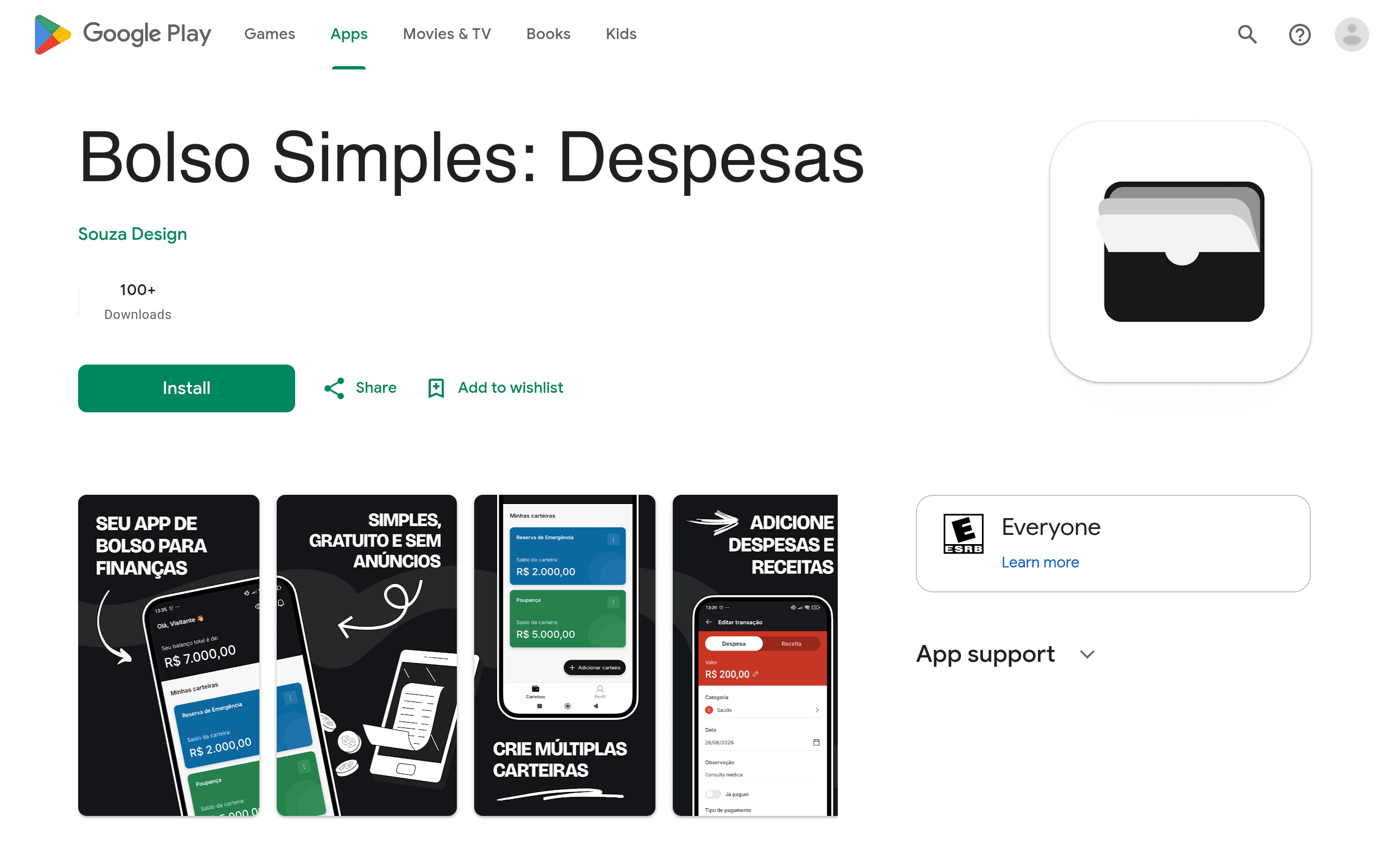
What Bolso Simples Actually Is
Bolso Simples (Portuguese for "Simple Pocket") is a personal finance app that just landed on the Google Play Store. It's built around one narrow job: logging money in and money out without asking you to link a bank account, categorize forty types of spending, or learn a budgeting philosophy first. Based on the app's own screenshots and listing, it's aimed squarely at people who've tried heavier finance apps, gotten overwhelmed, and quit.
There's no iOS listing found during this research — right now this is an Android-only release, distributed solely through Google Play under the package com.bolsosimples.app.
First Impressions
The interface leans into the "simples" in its name. Screens shown in the Play Store listing include a manual entry form for income and expenses, a running balance view, and basic category tagging. There's no visible sign of bank-sync (Open Finance/Plaid-style connections), automatic transaction imports, or investment tracking. This is a manual-entry ledger app, not an aggregator — closer in spirit to a digital version of a notebook than to a full money-management platform.
That's a deliberate tradeoff. Manual entry means no bank credentials shared with a third party, no failed-sync errors, and no surprise categorization mistakes from an algorithm guessing your spending. It also means the app is only as accurate as your discipline in opening it and typing in a transaction.
What's Missing (So Far)
As of this writing, the Play Store listing does not publish:
- Pricing tiers or subscription cost — no price is shown on the store listing itself, which for Android apps usually means it's free to download, but whether there are in-app purchases, ads, or a premium unlock isn't disclosed in the listing research.
- Multi-device sync or cloud backup details
- Export options (CSV, PDF reports)
- A web or desktop companion app
If you're evaluating this today, treat the cost as an open question you'll need to verify by installing it — go in expecting either a fully free app or a freemium model with an unadvertised paid tier, and don't be surprised either way.
Concrete Use Cases Where This Fits
- You're tracking a single checking account by hand and just want a faster alternative to a spreadsheet or paper notebook.
- You want to see a daily balance trend without connecting bank credentials to a third-party server.
- You're teaching a teenager or a family member budgeting basics and need something with almost no learning curve — a form, a number, a category, done.
- You had a bad experience with automatic bank-linking apps miscategorizing transactions or breaking sync, and want to go back to manual control.
Where It's Not a Fit
- You have multiple accounts, credit cards, and investments you want aggregated in one dashboard — Bolso Simples shows no evidence of multi-account aggregation.
- You want zero-based budgeting (assigning every dollar a job) — that's YNAB's whole model, and nothing in Bolso Simples' screenshots suggests budget-envelope functionality.
- You want automatic bank sync so you never manually enter a transaction — MoneyLover and PocketGuard both offer this in some regions/tiers; Bolso Simples currently does not appear to.
How It Compares
| Bolso Simples | MoneyLover | YNAB | PocketGuard | |
|---|---|---|---|---|
| Price | Not published; appears free to download on Google Play, IAPs unconfirmed | Free tier; Premium ~$2.99/mo or ~$29.99/yr | $14.99/mo or $99/yr (34-day free trial) | Free tier; Plus ~$7.99/mo or ~$34.99/yr |
| Bank sync | None visible — manual entry only | Yes, in supported countries | Yes, US/Canada banks via Plaid | Yes, US-focused bank linking |
| Core method | Manual income/expense ledger with categories | Manual + auto tracking, budgeting, bill reminders | Zero-based budgeting (assign every dollar) | Auto-categorization + "In My Pocket" spendable amount |
| Learning curve | Very low — open, type, save | Moderate — more menus and budget setup | Higher — requires learning the YNAB method | Low-moderate — mostly automated once linked |
| Best for | Manual trackers who want simplicity and no bank-linking | Users wanting budgeting + bill tracking with light automation | People who want disciplined, rules-based budgeting | People who want automation without deep budgeting rules |
| Platform | Android only (Google Play) | Android, iOS, Web | Android, iOS, Web | Android, iOS |
Should You Install It Today?
If you specifically want a lightweight, manual expense ledger and are uneasy about linking bank credentials to any app, Bolso Simples is worth the five minutes it takes to download and test — there's little downside since it appears to cost nothing to try. Log a week of real transactions before judging it; a ledger app lives or dies on whether the daily-entry friction is low enough that you'll actually keep using it.
If you need budgeting rules, bank sync, multi-account aggregation, or reporting/export features, none of that is visible in the current listing, and you're better served starting with MoneyLover's free tier or YNAB's trial, both of which have transparent, published pricing and known feature sets.
Given the lack of published pricing and the absence of an iOS version, this is an early-stage, minimal-viable release. Worth a look if simplicity is genuinely the feature you're after — not yet a replacement for a full budgeting suite.