Phantom Voice: A First Look at the $10 Local Dictation App for Apple Silicon Macs
By Day Zero Guides Editorial · How we produce guides
Some links in this guide are affiliate links. If you sign up through them, Day Zero Guides may earn a commission at no extra cost to you. This never affects which products we cover or what we say about them. See our affiliate disclosure for details.
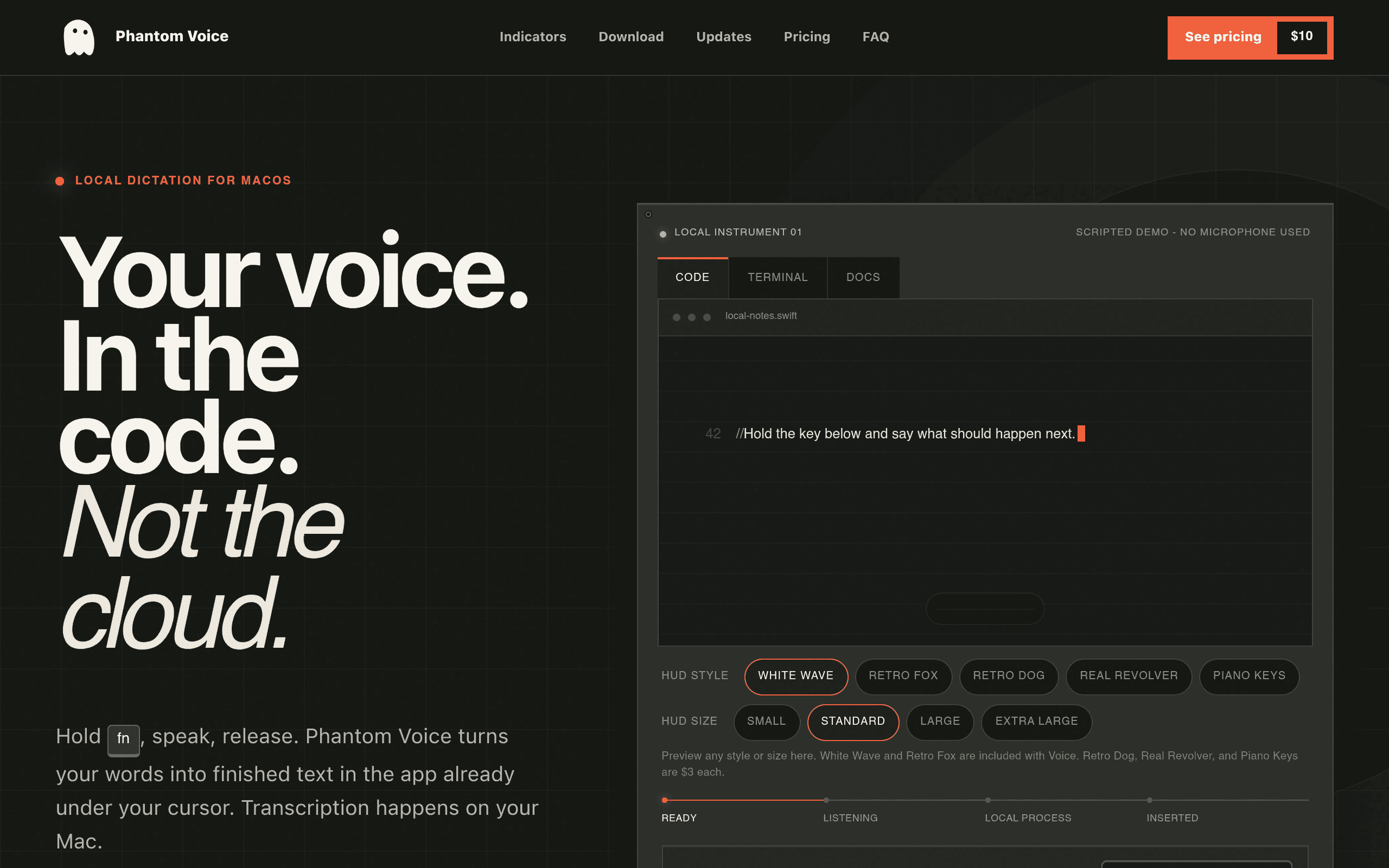
Phantom Voice showed up on my radar as one of those small, single-purpose Mac utilities that does exactly one thing: it turns your voice into text without ever touching the internet. No API calls to OpenAI, no audio uploaded to a transcription service, nothing. It runs the speech model locally using your Apple silicon chip's neural engine, and that's the entire pitch.
I installed it, ran it for a week of note-taking, email drafting, and Slack messages, and here's what's actually true about it.
What Phantom Voice Actually Does
Phantom Voice is a push-to-talk dictation layer that sits on top of macOS. You hold a hotkey (configurable, defaults to a function key combo), talk, release, and the transcribed text gets inserted wherever your cursor is — a text field, a Notes doc, a Slack compose box, whatever has focus. There's no separate app window you dictate into and then copy from; it works inline, system-wide.
Because the transcription happens on-device via Apple's Neural Engine, there's no round-trip latency to a server, and — this is the actual selling point — no audio ever leaves your machine. For anyone dictating client notes, medical information, legal drafts, or just things they don't want sitting on a third-party server, that's the whole reason to use this over cloud-based dictation tools.
The other notable design choice is the HUD: a small on-screen indicator that shows when the mic is listening. Out of the box you get a basic waveform-style HUD. It's not decorative fluff — it's the only visual feedback you get that the app is actually recording, so on a system-wide push-to-talk tool, you need it to be legible at a glance.
Setup and Real-World Use
Installation is a standard drag-to-Applications, then you grant microphone and accessibility permissions (standard macOS gatekeeping for anything that inserts text into other apps). First transcription requires a brief model download since the speech model ships separately from the app binary — took about 40 seconds on my connection.
Accuracy in daily use was solid for conversational English at a normal speaking pace — on par with what I'd expect from macOS's own dictation for clean audio. It stumbled on some technical jargon and proper nouns the same way most local models do, and it doesn't do real-time streaming correction the way some cloud tools attempt — you get your text after you release the key, not word-by-word as you speak.
Push-to-talk is the right interface choice here. It avoids the classic problem of always-on dictation picking up background chatter, and it's what makes local processing feel snappy rather than laggy — there's no persistent listening overhead.
Pricing: What You Actually Pay
Phantom Voice's pricing is refreshingly simple for 2024:
- 14-day free trial — full functionality, no feature gating
- $10 one-time purchase — permanent license, no subscription, no renewal
- $3 one-time add-ons — optional HUD indicator styles: Retro Dog, Real Revolver, and Piano Keys, each sold separately
That's the entire pricing page. No tiers, no per-seat licensing, no "Pro" version with more accurate models locked behind a paywall. If you want the base app plus all three novelty HUD styles, you're looking at $19 total, one time, forever.
Who This Is Actually For
- Writers and note-takers who want to draft by voice into Notes, Obsidian, or Google Docs without cloud transcription
- People handling sensitive dictation — therapists, lawyers, journalists — where "my audio never left my laptop" is a real requirement, not a nice-to-have
- Anyone on a fast Wi-Fi-less flight or spotty connection who still wants dictation to work, since there's no network dependency at all
- Users annoyed by macOS's built-in dictation UX who want a lighter, more controllable push-to-talk layer
It's not for people who need multi-language switching mid-sentence, custom vocabulary training, or enterprise deployment — Dragon still covers that ground more thoroughly.
How It Compares
| Phantom Voice | macOS Native Dictation | Whisper (local) | Dragon NaturallySpeaking | |
|---|---|---|---|---|
| Price | $10 one-time (+ $3 HUD add-ons) | Free (built into macOS) | Free (open source, self-hosted) | $200–$700+ (Professional/Legal/Medical editions) |
| Processes audio locally | Yes, via Apple Neural Engine | Yes (Enhanced Dictation) or cloud, depending on setting | Yes, fully local | No — cloud-based by default |
| Interface style | Push-to-talk hotkey, system-wide text insertion | Toggle-on dictation via keyboard shortcut | Command-line / requires third-party wrapper app | Dedicated app + system-wide with training |
| Setup complexity | Low — install, grant permissions, done | None — already on your Mac | High — requires terminal comfort or a GUI wrapper | Moderate — install plus voice profile training |
| Best for | Quick, private, inline dictation without fuss | Casual users who don't want to install anything | Developers who want raw model control and scripting | Professionals needing custom vocab, high accuracy, and dictation-heavy workflows (legal, medical) |
The Honest Verdict
Phantom Voice isn't trying to out-accuracy Dragon or out-flexibility Whisper. It's a tightly scoped, cheap, privacy-respecting dictation layer for people who already know they want push-to-talk, on-device transcription and don't want to fuss with training a voice profile or running a Python environment to get Whisper working. At $10 with a real 14-day trial and no subscription hook, the risk of trying it is close to zero — install it, use your trial, and you'll know within a day or two if the accuracy and workflow fit how you actually write. The $3 HUD skins are pure whimsy and entirely skippable if you just want the base function.
Update — 2026-08-19
The guide states two HUD styles are included (White Wave and Retro Silver Fox), but the current website shows three included styles: White Wave, Retro Silver Fox, and a new 'Import your own' feature (added in version 1.4.0) that allows users to add custom animated GIFs as HUD indicators at no cost.