PromptShot: First Look at the Chrome Extension That Turns Screenshots Into Ready-to-Paste LLM Prompts
By Day Zero Guides Editorial · How we produce guides
Some links in this guide are affiliate links. If you sign up through them, Day Zero Guides may earn a commission at no extra cost to you. This never affects which products we cover or what we say about them. See our affiliate disclosure for details.
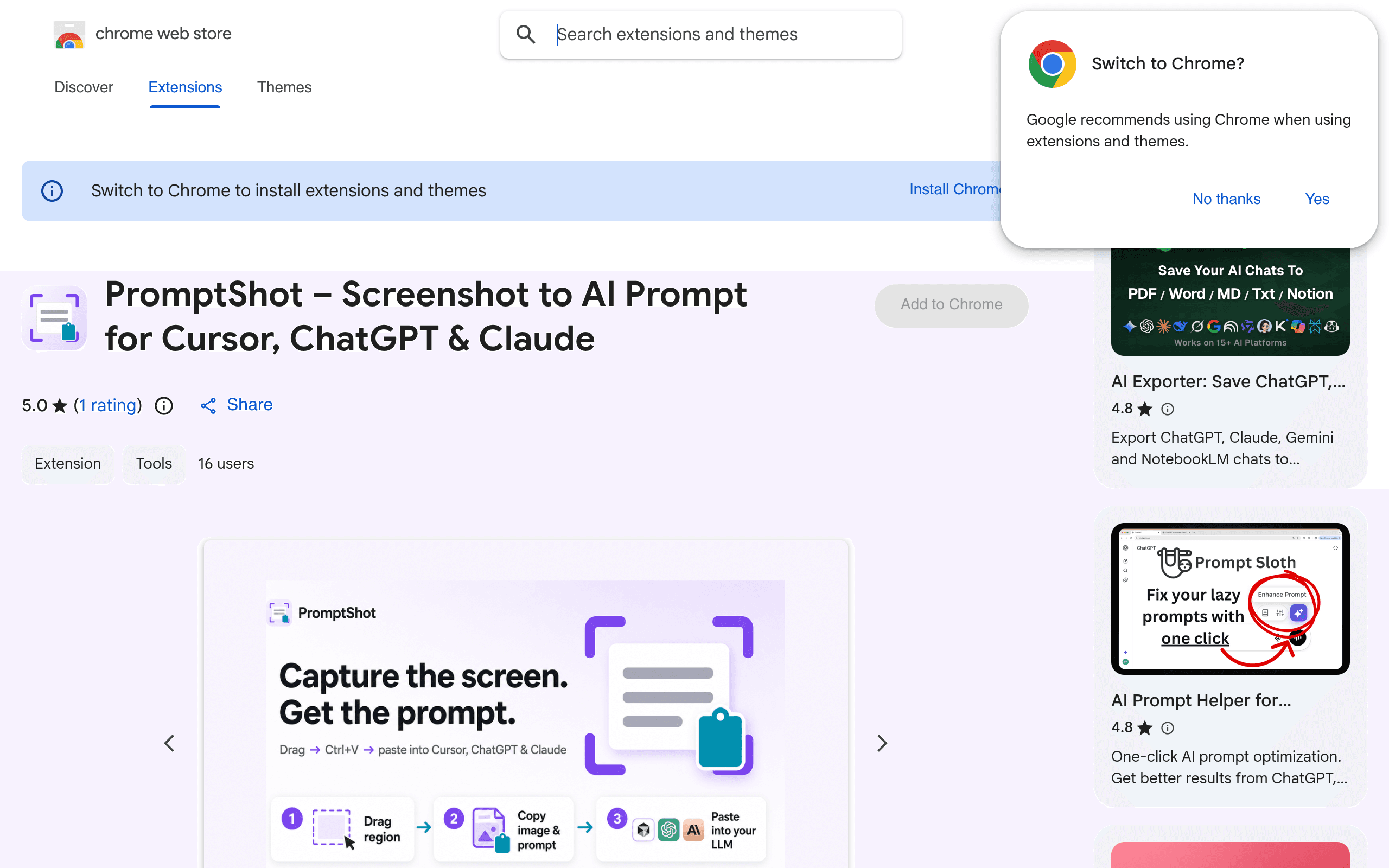
What PromptShot Actually Does
PromptShot is a Chrome extension (installed from the Chrome Web Store) that solves a very specific, very annoying workflow problem: you see a UI bug, a weird layout, or a piece of code rendered in a browser, and you want to hand it to an AI coding assistant with context — not just a raw PNG.
Instead of screenshotting, saving the file, switching to ChatGPT or Cursor, uploading the image, and then typing out "here's a bug, fix it" by hand, PromptShot lets you drag-select a region of any webpage and immediately generates a structured, LLM-ready prompt bundled with the image. You copy or paste that directly into Cursor, Claude, or ChatGPT and skip the manual context-writing step entirely.
It's not a general-purpose screenshot tool trying to compete on annotation polish or video capture — it's built around one narrow job: closing the gap between "I see a problem on screen" and "the AI has enough context to help."
Setup and First Impressions
Installation is standard Chrome Web Store stuff — add the extension, pin it to your toolbar, and you're capturing within a minute. There's no account creation wall blocking the free tier, which matters for a tool like this; you want to test it on a real bug the moment you hit one, not fill out a signup form first.
The free tier covers region capture and basic presets — enough to try the core loop (select region → get prompt + image → paste into your AI tool of choice) without paying anything. If you only screenshot a handful of things a week, the free tier is genuinely usable long-term, not just a crippled trial.
Pricing
PromptShot's pricing is unusually cheap for what's effectively a productivity multiplier tool:
| Tier | Price | What you get |
|---|---|---|
| Free | $0 | Region capture, basic prompt presets, paste into Cursor/ChatGPT/Claude |
| Pro | $2 (one-time, per changelog notes) | Custom presets, markup/annotation tools, recording features |
That $2 Pro price point (confirmed via the extension's own changelog rather than a pricing page) is worth flagging as unusual — most Chrome extensions with a "Pro" tier either go subscription or charge $10+ for a one-time unlock. At $2, the upgrade decision barely requires justification if you're using the free tier more than a couple times a week and want custom presets or markup.
Concrete Use Cases
- Reporting a CSS bug to Cursor while pair-programming with AI: select the broken element, PromptShot generates a prompt like "here's a screenshot of [region] — the layout is broken, expected X, got Y," paste straight into Cursor's chat instead of writing that description yourself.
- Sending a design QA note to Claude: capture a component that doesn't match the Figma spec, let PromptShot's preset wrap it in a structured prompt, paste into Claude's web interface for a diff-style explanation.
- Debugging a console error visible in DevTools: region-capture the error plus surrounding code, get an instantly pasteable prompt for ChatGPT without retyping the stack trace.
- Building a bug backlog from a design review: with Pro's custom presets, set up a repeatable template ("describe visual bug, suggest fix, keep response under 100 words") so every capture during a review session produces consistently formatted prompts.
How It Compares
PromptShot isn't trying to be a full screenshot suite — it's trying to be the fastest bridge between "I saw something on a webpage" and "an LLM has the context to act on it." That puts it in an odd comparison spot against tools that do screenshots well but weren't built for AI workflows.
| Tool | Price | Key Feature | Best For |
|---|---|---|---|
| PromptShot | Free / $2 Pro | Auto-generates LLM-ready prompt + image bundle from a region capture | Developers and designers feeding bugs/UI issues into Cursor, ChatGPT, or Claude |
| CleanShot X | $29 one-time or $8/mo (Cloud plan) | Polished annotation, scrolling capture, screen recording, cloud sharing | Mac users who need professional-grade screenshots for docs, marketing, or support tickets |
| ShareX | Free (open source) | Enormous customization: workflows, hotkeys, upload destinations, OCR | Power users on Windows who want a free, endlessly configurable capture tool |
| Claude web interface (native paste) | Included with Claude access | Paste or upload a screenshot directly into chat, no separate tool needed | Quick one-off image sharing when you're already willing to type your own context |
The honest comparison here is that CleanShot X and ShareX are better screenshot tools in almost every traditional sense — better annotation, better file management, actual video recording that isn't gated behind a $2 unlock. But neither one saves you the step of writing out what you want the AI to do with the image. Claude's native paste handles the upload fine, but you're still typing the prompt yourself every time.
PromptShot's value isn't image quality or feature depth — it's the elimination of the copy-paste-and-type-context loop that happens dozens of times a day for anyone using AI tools alongside a browser. If that loop isn't part of your workflow, PromptShot has nothing for you. If it is, the free tier costs nothing to test today, and Pro costs less than a coffee.
Should You Install It Today
If you're a developer or designer who regularly screenshots something in a browser and then manually explains it to Cursor, ChatGPT, or Claude, PromptShot removes a small but repeated friction point for free, with no signup required to try it. It won't replace CleanShot X if you need it for polished documentation screenshots, and it won't replace ShareX if you live inside a heavily customized Windows capture workflow. But as a narrow, purpose-built tool for the specific act of turning "screenshot" into "AI prompt," it's cheap enough and low-friction enough that there's little reason not to install it and see if the workflow sticks after a day of real use.