Safe Outreach: A First Look at the Tool That Checks If LinkedIn Can See Your Automation Extension
Some links in this guide are affiliate links. If you sign up through them, Day Zero Guides may earn a commission at no extra cost to you. This never affects which products we cover or what we say about them. See our affiliate disclosure for details.
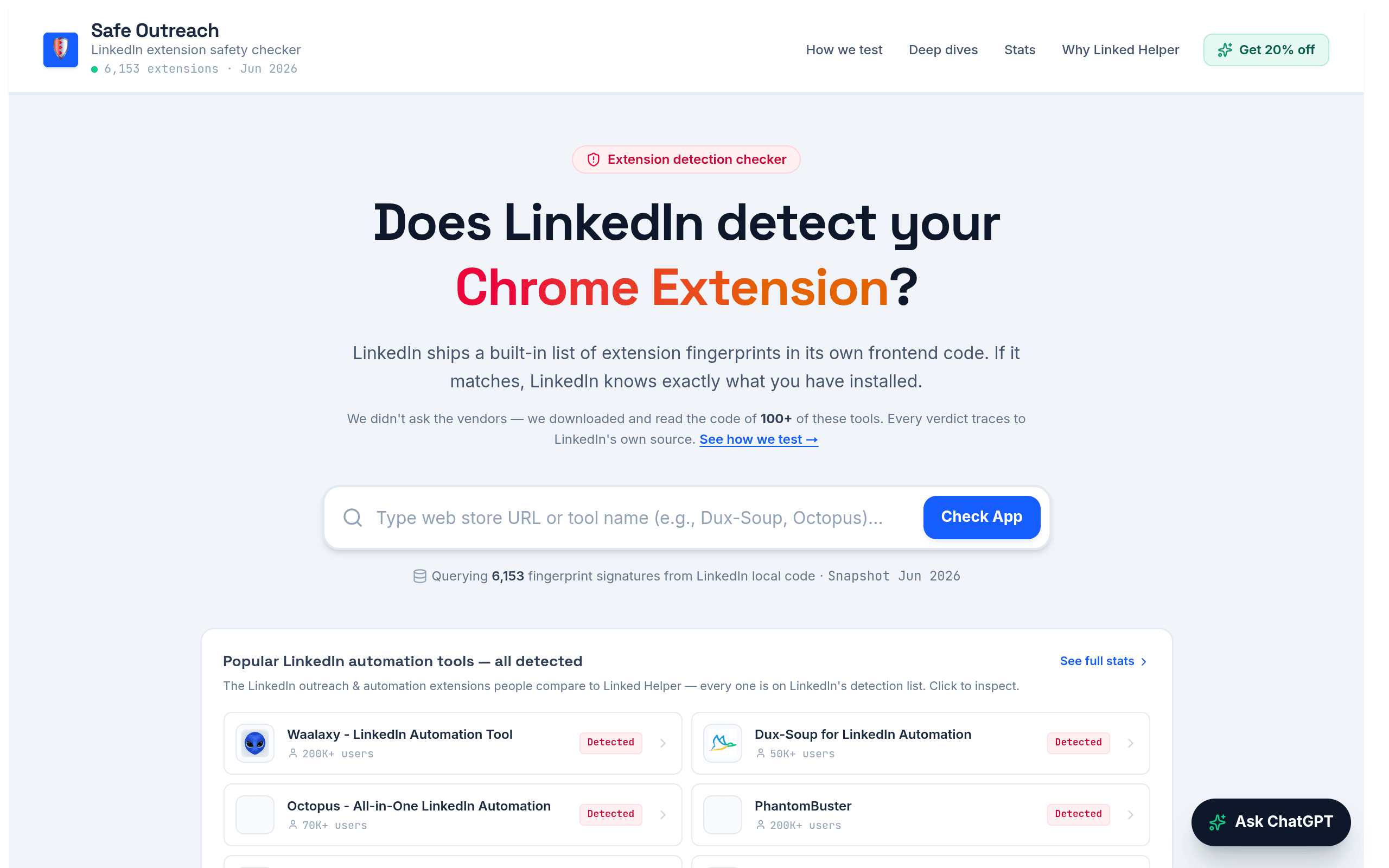
What Safe Outreach Actually Does
Safe Outreach is a narrow-purpose Chrome extension checker built around one question: does LinkedIn already know about the automation tool you're about to install?
LinkedIn maintains something called Active Extension Detection (AED) — an internal fingerprint list LinkedIn's web app uses to identify browser extensions running in a user's session. Safe Outreach's research indicates this list currently contains 6,153+ known extension fingerprints. If the LinkedIn automation or scraping tool you're using (or considering) is on that list, LinkedIn's platform can flag your account for automation activity, which is the fastest route to a restriction or permanent ban.
Safe Outreach checks a given extension against that fingerprint database and reports back whether it's a known, detectable signature. Separately, it also looks at a second and arguably more important risk: where your session data goes. Many LinkedIn automation extensions work by hooking into your authenticated session and then relaying activity data — sometimes including session cookies or credentials — to a vendor's own servers for processing (this is how a lot of "cloud-based" LinkedIn automation tools work under the hood). Safe Outreach flags whether an extension appears to keep everything local to your browser or whether it's phoning home to a third party.
So in practice, Safe Outreach isn't a prospecting tool, an email finder, or a CRM enrichment layer. It's a pre-flight safety check you run before you hand a browser extension access to your LinkedIn session.
Who This Is Actually For
- Sales ops / RevOps leads vetting a new LinkedIn automation tool (Dux-Soup, Waalaxy, Expandi, Zopto, We-Connect, etc.) before rolling it out to a team of SDRs, where one flagged account can cascade into a whole domain getting rate-limited.
- Agencies running outreach on client LinkedIn accounts, who carry liability if a client's account gets restricted because of a tool the agency chose.
- Solo founders and recruiters who rely heavily on LinkedIn for pipeline and can't afford a 2-week account restriction while they're mid-fundraise or mid-search.
- Security-conscious teams who want to know whether a "free" or cheap LinkedIn automation extension is quietly exfiltrating session data to a vendor server as part of its business model.
If you've never installed a third-party LinkedIn extension and only use LinkedIn's native Sales Navigator or InMail, this tool has nothing for you. It's specifically for people already in, or about to enter, the LinkedIn-automation-extension ecosystem.
Pricing: Not Published Yet
As of this writing, Safe Outreach has no public pricing page — no free tier, paid tier, or usage limits are documented on the site. That's worth flagging plainly: you should not assume this is free forever, and you also shouldn't assume it requires a credit card to try. Check the site directly before you build any workflow around it, since this is the kind of detail that changes fast for a newly launched tool. We'll update this guide once pricing is confirmed.
How It Compares
There's no direct competitor doing "LinkedIn AED fingerprint checking" today — this is a genuinely new category. But since most people evaluating LinkedIn outreach risk are also evaluating prospecting/enrichment tools in the same budget conversation, here's how Safe Outreach stacks up against three tools people often mention in the same breath when talking about "LinkedIn outreach stack," even though the comparison highlights how different the jobs are:
| Safe Outreach | Hunter | Clearbit | RocketReach | |
|---|---|---|---|---|
| Core function | Checks if a LinkedIn automation extension is on LinkedIn's AED detection list; flags credential/session data exfiltration | Finds and verifies email addresses by domain or name | Enriches company/contact data via API, often used in-app for lead scoring | Finds emails, phone numbers, and social profiles for individual contacts |
| Price | Not published | Free tier (25 searches/mo); paid from $34/mo (Starter) | Custom/enterprise pricing, typically quote-based, no self-serve tier | Free tier (5 lookups/mo); paid from $53/mo (billed annually) |
| Detects LinkedIn ban/detection risk | Yes — this is its entire purpose | No | No | No |
| Checks where your data/session goes | Yes — flags local vs. vendor-server data handling | No | No — though Clearbit itself is a data vendor, so the question runs the other way | No |
| Best for | Vetting a LinkedIn automation tool before install | Cold email list-building | Enriching inbound leads with firmographic data | Building contact lists for outbound |
The honest takeaway from that table: Safe Outreach doesn't replace Hunter, Clearbit, or RocketReach, and they don't replace it either. If your stack includes a LinkedIn automation extension alongside any of those three, Safe Outreach is the missing risk check none of them perform.
What It Won't Tell You
A few limits worth knowing before you rely on this:
- Being absent from the current AED list doesn't guarantee permanent safety — LinkedIn updates its fingerprint database, and a tool that's undetected today can be added later.
- It checks the extension's detectability and data-handling pattern, not your account's overall automation risk (send volume, connection request pacing, and account age still matter independently).
- It's a checker, not a blocker — it won't stop LinkedIn from seeing anything; it only tells you what's already visible or already being sent elsewhere.
Bottom Line
If you or your team already run, or are about to install, a LinkedIn automation extension, spending five minutes running it through Safe Outreach before rollout is cheap insurance against a mid-quarter account restriction. It's not a growth tool, an enrichment platform, or a Hunter/Clearbit/RocketReach substitute — it's a narrow, useful safety check for a very specific and previously invisible risk. Given pricing isn't public yet, the move today is simple: go check the extension you're already using, see what it reports, and decide from there whether the (currently unknown) cost is worth it for your situation.