Tabsfly: First Look at the Local-Only Tab Workspace Manager for Chrome
By Day Zero Guides Editorial · How we produce guides
Some links in this guide are affiliate links. If you sign up through them, Day Zero Guides may earn a commission at no extra cost to you. This never affects which products we cover or what we say about them. See our affiliate disclosure for details.
Tabsfly: First Look at the Local-Only Tab Workspace Manager for Chrome
If you're the kind of person running 40+ tabs across three windows right now, you've probably already tried OneTab or Workona. Tabsfly is a new entrant in the same space, but with a specific pitch: everything happens on your machine, there's no account to create, and nothing gets sent anywhere. Here's what it actually does and whether it's worth installing today.
What Tabsfly Actually Does
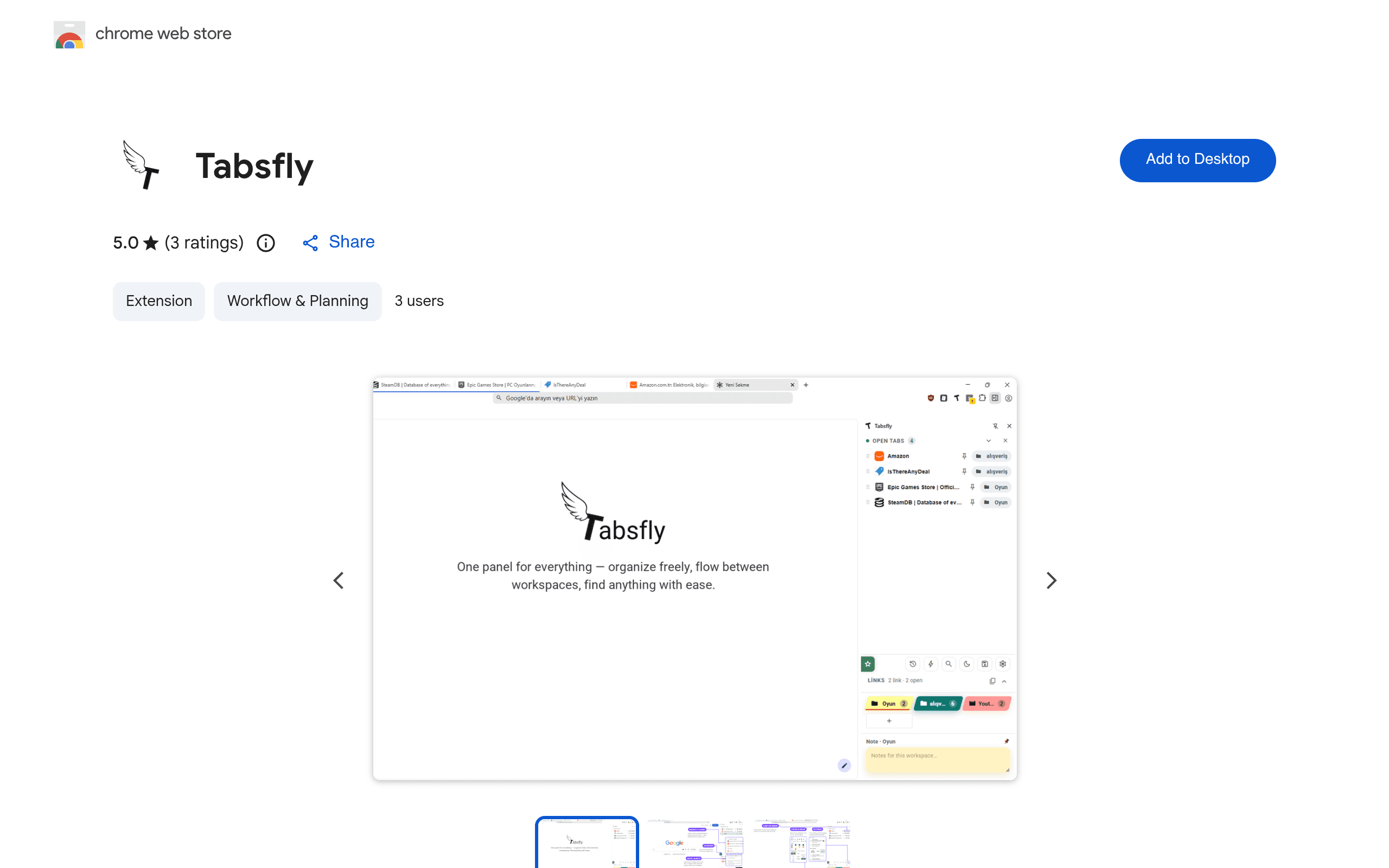
Tabsfly is a Chrome extension (available now on the Chrome Web Store) that lets you organize open tabs into named workspaces instead of leaving them scattered across windows. The core feature set, based on what's shipped in the current build:
- Workspaces — group tabs by project, client, or context (e.g., "Client X Research," "Weekend Reading," "Taxes 2024") and switch between them without hunting through window after window.
- Tab grouping within workspaces — cluster related tabs so a workspace doesn't just become another junk drawer.
- Saved links / favorites — bookmark-style saving that lives inside the extension rather than Chrome's native bookmarks bar, so it doesn't compete with your existing bookmark structure.
- Quick launch shortcuts — fire up a set of tabs (say, your daily tool stack: email, calendar, project tracker) in one click instead of opening each manually.
- Fully local storage — Tabsfly states plainly that it runs with no accounts, no tracking, and no data transmission. Your workspaces and saved tabs live in your browser's local storage, not on a vendor's server.
That last point is the actual differentiator. Most tab managers in this category ask you to sign in (Workona does) or sync through a cloud backend. Tabsfly skips that entirely, which means no sign-up friction, but also no cross-device sync — if you switch machines, your workspaces don't follow you.
Pricing
Tabsfly does not publish a pricing page or tiered plan structure at launch. It installs directly from the Chrome Web Store with no paywall, no trial countdown, and no account prompt gating features. In practice, that means everything currently visible in the extension — workspaces, grouping, saved links, quick launch — is usable for free right now. There's no indication yet of a future pro tier, but since there's no account system at all, it's unclear how a paid tier would even be gated (per-device license key is the most likely path if one appears later). If you're evaluating it today, budget for $0 and reassess if that changes.
Concrete Use Cases
- Freelancers juggling clients: Keep a workspace per client with their project docs, shared drive, and communication tool pre-grouped, then quick-launch the whole set when a call starts.
- Researchers/students mid-paper: Dozens of source tabs open at once — group them into a "Lit Review" workspace instead of losing track of which tab was which citation.
- Context-switchers: Separate "Work," "Personal admin," and "Reading later" into distinct workspaces so your work window isn't cluttered with a flight booking and three recipe tabs.
- Privacy-conscious users: Anyone who's wary of tab managers that require a login (and therefore a server relationship) gets the organizational benefit without handing tab/URL data to a third party.
How It Compares
| Tabsfly | OneTab | The Great Suspender | Workona | |
|---|---|---|---|---|
| Price | Free (no published tiers) | Free | Free (original abandoned; forks like The Marvellous Suspender continue it) | Free tier + paid plans (~$4.16–$8/mo billed annually) |
| Core mechanic | Named workspaces with tab grouping, saved links, quick launch | Collapses all open tabs into a single list to free up memory | Auto-suspends inactive tabs to save RAM, doesn't organize them | Full workspace suites with resources, sessions, and team sharing |
| Account required | No | No | No | Yes, for sync and paid features |
| Data handling | Local only, no transmission stated | Local list, no account needed | Local, though the original extension's 2021 ownership change introduced tracking/malware concerns that got it pulled from the Chrome Web Store | Cloud sync required for cross-device use |
| Best for | Users who want organized, named workspaces without any account or sync | Users who just want to bulk-close tabs and reopen later, minimal organization | Users mainly trying to reduce memory usage, not organize tabs | Teams and power users who need cross-device sync, integrations, and shared workspaces |
A note on The Great Suspender: it's worth knowing the history if you haven't already run into it. The original was pulled from the Chrome Web Store in early 2021 after a new owner pushed an update containing tracking code, and Google flagged it as malware. Trustworthy forks exist (The Marvellous Suspender is the most commonly recommended), but it's a cautionary tale for exactly the kind of trust Tabsfly is leaning on by staying local-only and account-free.
Where Tabsfly Falls Short (For Now)
- No cross-device sync. If your workflow spans a work laptop and a personal machine, your workspaces won't follow you. This is the direct tradeoff for having no account system.
- No published roadmap or pricing plan. It's a new listing, so there's no changelog history to judge update cadence or long-term support against.
- No team/sharing features. If you need to hand a workspace to a collaborator (Workona's bread and butter), Tabsfly doesn't currently support that.
- Unknown backup story. Because everything is local, clearing browser data or reinstalling Chrome could wipe your workspaces unless Tabsfly has an export function — worth testing before you build your whole tab structure around it.
Should You Install It Today?
If you want tab organization without creating another account or trusting another company's server with your browsing structure, and you work primarily on a single machine, Tabsfly is a low-risk install — it's free, it's not asking for permissions beyond what a tab manager needs, and the local-only design is a real (not marketed) privacy advantage. If you need sync across devices or team sharing, stick with Workona. If you just want fewer open tabs with zero organizational overhead, OneTab remains the simpler tool. Skip The Great Suspender's original listing entirely, but its trusted forks are still fine if RAM usage, not organization, is your actual problem.