Test Data Filler: A No-Frills Chrome Extension for QA Testers Who Are Tired of Typing 'asdf@asdf.com' 500 Times a Day
Some links in this guide are affiliate links. If you sign up through them, Day Zero Guides may earn a commission at no extra cost to you. This never affects which products we cover or what we say about them. See our affiliate disclosure for details.
The problem this is actually solving
If you test forms for a living, you know the drill: fill in a name, email, phone number, address, click submit, check the validation, then do it again with garbage data to make sure the form rejects it, then do it again with a SQL injection string or an emoji-stuffed field to see if anything breaks. Multiply that by every form on every build. Most people either write their own Faker.js snippets, keep a text file of junk strings to paste, or just get lazy and skip the negative test cases entirely.
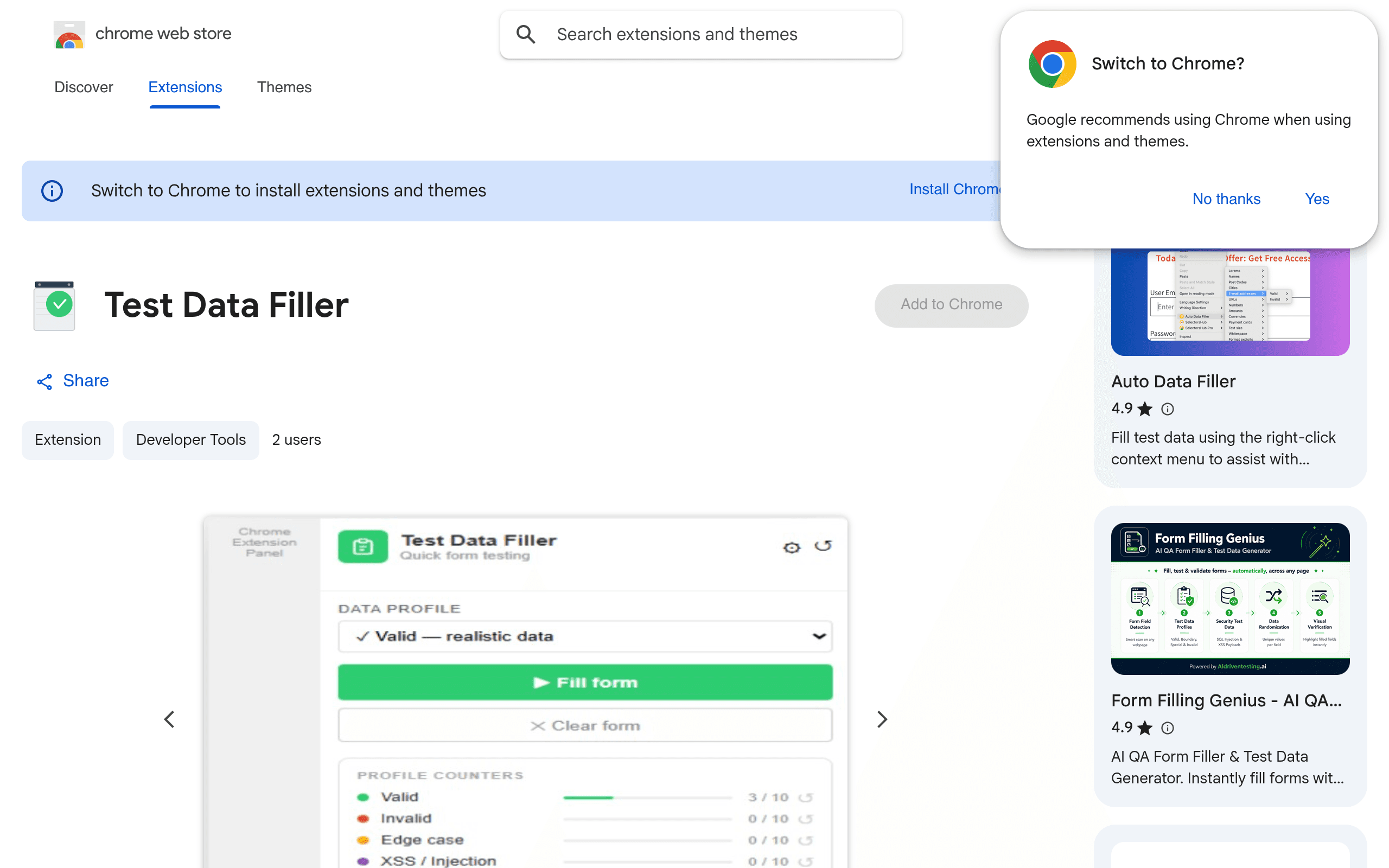
Test Data Filler is a free Chrome extension aimed squarely at that repetitive middle step. It doesn't try to be a full test automation framework — it's a toolbar utility that detects form fields on the page and fills them from one of four data profiles you control: valid, invalid, edge case, and security payloads. You click the extension icon (or a hotkey), it fills the visible form, and you move on.
What's actually in the box
- Four built-in profiles — valid (realistic names, emails, phone numbers, addresses), invalid (malformed emails, out-of-range numbers, wrong-format dates), edge case (empty strings, max-length strings, unicode, whitespace-only input, extreme numbers), and security payloads (XSS strings, SQL injection patterns, path traversal attempts, script tags).
- Smart field detection — it reads input types, name/id attributes, and placeholder text to guess what kind of data a field expects, rather than just dumping random text into every box.
- Per-profile cycling — you can cycle through multiple values within a profile instead of always getting the same fill, useful when you need to test a form several times without repeating identical input.
- Custom data editing — you're not locked into the defaults. You can open the profile editor and add, remove, or edit the specific strings/values used for any profile, including your own security payloads if you're testing something specific to your stack.
- Import/export — profiles can be exported (JSON) and shared with teammates or imported into another machine, which matters if your QA team wants everyone testing against the same edge-case list.
- Local storage only — no account, no sync to a server, no telemetry mentioned. Everything lives in the browser's local storage, which is reassuring given that security payload strings are, by nature, not something you want floating around a third-party server.
Pricing
Test Data Filler is completely free on the Chrome Web Store. There's no paid tier, no upsell inside the extension, and no account creation. It's a straightforward install-and-use tool — install from the Chrome Web Store, pin it to your toolbar, and it's ready.
Concrete use cases
- Regression testing a signup form — cycle the valid profile to fill name/email/password fields quickly across multiple test runs without retyping.
- Validation testing — switch to the invalid profile to confirm a form actually rejects malformed emails, negative ages, or improperly formatted phone numbers instead of silently accepting them.
- Boundary testing — use the edge case profile to check what happens when a text field gets a 10,000-character string, or a number field gets
-1orInfinity. - Basic security smoke-testing — run the security payload profile against a form to see if raw
<script>tags or' OR 1=1 --strings get rendered unescaped or trigger unexpected behavior, before a real pentest even happens. - Team-shared edge case libraries — export your customized invalid/edge-case profiles and hand them to teammates so the whole QA team is testing against the same known troublemakers.
How it stacks up
| Test Data Filler | Auto Data Filler | Form Filling Genius | FakerFill | |
|---|---|---|---|---|
| Price | Free | Free | Free with optional donation-ware tier | Free |
| Data profiles | 4 built-in (valid, invalid, edge case, security payloads), fully editable | Single generic fill mode, some field-type presets | Valid-data focus only, templated by field type | Valid data via Faker.js-style generation, some category presets |
| Security/negative testing | Yes — dedicated security payload profile with XSS/SQLi/path traversal strings | No | No | No |
| Cycling through multiple values | Yes, per profile | Limited | No | Yes, random each time (not profile-based) |
| Import/export profiles | Yes, JSON | No | No | No |
| Data storage | Local only | Local only | Local only | Local only |
| Best for | QA testers who need valid and invalid/edge/security test data in one tool | Casual users wanting quick form autofill for personal use | Developers who just want realistic-looking placeholder data fast | Developers wanting Faker-style random valid data for demos |
The honest differentiator is the security and edge-case angle. Auto Data Filler, Form Filling Genius, and FakerFill are all built around the same core idea — generate realistic-looking valid data and drop it into a form fast — which is genuinely useful for demoing an app or populating a dev database. But none of them are built for negative testing. If you need a tool that also throws malformed input and injection strings at a form, Test Data Filler is the only one of the four doing that natively.
Where it falls short
Smart field detection is only as good as the naming conventions on the page it's filling. On forms with generic field names (field1, input_3) or heavily obfuscated class names from a component library, it'll fall back to guessing by input type, which can mean an email-shaped string ends up in a field meant for a username. It's also a single-page tool in the sense that it fills what's visible — it won't walk a multi-step wizard form for you or handle dynamically injected fields that appear after a fill (you'll need to trigger it again). And because it's brand new, there's no established plugin ecosystem or Selenium/Cypress integration — it's a manual, in-browser tool, not part of an automated test pipeline.
Should you install it today
If your day involves manually poking at forms — checking validation messages, trying to break signup flows, or doing a first-pass security sanity check before a real audit — this is worth the thirty seconds it takes to install. It's free, it's local-only (no data leaving your machine, which matters when the data includes injection strings), and it does something the more popular "just fill this form" extensions don't bother with. If all you need is quick, realistic dummy data for a demo, any of the three alternatives will do the job with less setup. But for actual QA work where negative and edge-case testing matter, Test Data Filler is filling a gap the others left open.