usbRecognized Speaker Test: First Look at the Free Browser-Based Audio Diagnostic Tool
By Day Zero Guides Editorial · How we produce guides
Some links in this guide are affiliate links. If you sign up through them, Day Zero Guides may earn a commission at no extra cost to you. This never affects which products we cover or what we say about them. See our affiliate disclosure for details.
What usbRecognized Actually Does
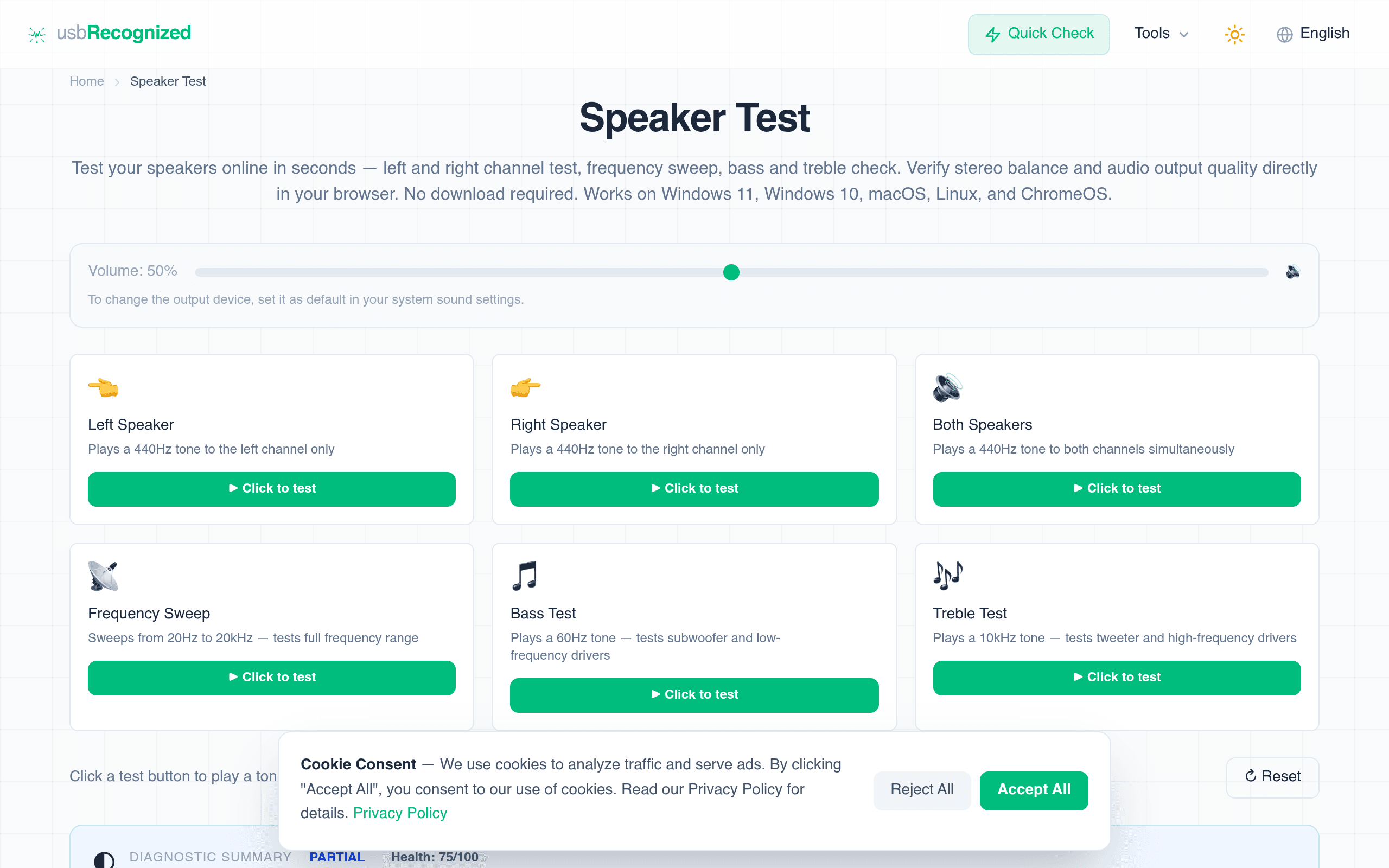
usbRecognized is a browser-based speaker testing tool at usbrecognized.com/speaker-test. There's nothing to install — you open the page, click play, and it runs a series of audio outputs designed to expose problems with your speakers, headphones, or USB audio interface. The tool covers:
- Left/right channel isolation tests — plays a tone in one channel only, so you can confirm your stereo wiring or Bluetooth pairing isn't swapped or dropping a side
- 20Hz–20kHz frequency sweep — the full range of human hearing, useful for catching dead spots where a driver isn't reproducing certain frequencies
- Bass tones — isolates low-end output to check subwoofers or bass drivers for rattling, distortion, or total silence
- Treble tones — isolates high-end output to catch blown tweeters or muffled highs
It runs entirely in-browser using the Web Audio API, which is why it works identically on Windows, macOS, Linux, and ChromeOS without drivers or plugins. I tested it in Chrome and Firefox on a Windows laptop and a Chromebook; both played tones instantly with no lag or buffering delay.
Who Actually Needs This
This isn't a tool most people open twice a month. It's a tool you reach for in specific, annoying moments:
- You just plugged in a new USB DAC or audio interface and want to confirm both channels are actually outputting before you trust it for recording or mixing
- You're troubleshooting a "my headphones sound weird" complaint — running the sweep tells you in 30 seconds whether it's a hardware dead spot or just a bad recording
- You bought used speakers or a secondhand soundbar and want to verify all drivers work before the return window closes
- You're setting up a conference room or classroom AV system and need to confirm left/right assignment on ceiling speakers before a meeting
- IT support techs doing quick triage on a user's "no sound" ticket, without wanting to install a diagnostic app on a machine they don't own
If you're a professional audio engineer, you probably already own dedicated calibration hardware and software — this tool is not a replacement for that. It's for quick, no-friction verification.
Pricing
usbRecognized's speaker test is free, with no account, no paywall, and no tiered plans. There's no "pro" version mentioned anywhere on the site. That simplicity is part of the pitch — it's positioned as a utility, not a product with an upsell funnel.
How It Compares
| usbRecognized | Online-Tone-Generator | Speaker-Test-by-Voicemeeter | AudioCheck.net | |
|---|---|---|---|---|
| Price | Free, no signup | Free, no signup | Free (bundled with Voicemeeter, a donation-supported app) | Free, with some tests behind a "support us" donation nudge |
| Install required | None — runs in browser | None — runs in browser | Yes — Voicemeeter is a Windows desktop app (VB-Audio) | None — runs in browser |
| Best for | Fast left/right and frequency-range speaker diagnosis | Generating a single custom tone at a precise frequency/volume for tuning or testing | Testing speaker channels through a virtual mixer, useful if you already use Voicemeeter for routing | Deep-dive listening tests: stereo phase, hearing range, MP3 compression artifacts, room acoustics |
| Platform support | Windows, macOS, Linux, ChromeOS | Any OS with a modern browser | Windows only (Voicemeeter is Windows-specific) | Any OS with a modern browser |
| Test variety | Channel isolation, full sweep, bass, treble — curated set | Single adjustable tone generator, more manual/technical | Channel test tied to Voicemeeter's routing setup | Wide library: tone tests, sample tracks, hearing tests, codec comparisons |
The Honest Tradeoffs
usbRecognized wins on simplicity and OS coverage — it's the only one of the four that works natively on ChromeOS and Linux without workarounds, and it's built around a curated set of tests rather than a raw tone generator you have to configure yourself. That makes it faster for someone who just wants a yes/no answer on "are my speakers broken."
Where it loses: it doesn't do the granular stuff. Online-Tone-Generator lets you dial in an exact frequency and volume if you're doing something specific like testing tinnitus masking or calibrating a subwoofer crossover point. AudioCheck.net has a genuinely deep library — stereo phase tests, MP3 artifact comparisons, binaural tests — that goes well beyond speaker health checks. And if you're already living inside Voicemeeter for audio routing on a Windows machine, its built-in speaker test integrates with your existing signal chain in a way a standalone browser tool can't.
Bottom Line
If you want a fast, zero-friction check on whether your speakers, headphones, or USB audio device are working correctly across both channels and the full frequency range, usbRecognized's speaker test does exactly that with no signup and no install. It's not the tool for precise frequency tuning or advanced acoustic analysis — for that, AudioCheck.net or Online-Tone-Generator are better fits. But for the common case of "something sounds off, let me check quickly," it's worth bookmarking.